
Support at scale

Every customer question, in one place with one owner.

Every WhatsApp message, every email reply and every SMS your customers send lands in one list your whole team can work from. Each conversation gets an owner, a status and a place it belongs — and the chatbot hands over to a person the moment the customer asks for one.

WhatsApp, email and SMS in one listAssigned to a person, not a pileBot hands over mid-chatReopens when they reply

Support does not break at the answer. It breaks before it.

Most small teams can answer any question a customer asks. What they cannot do is see all the questions at once, know whose job each one is, and be sure none of them went quiet. That is the part this fixes.

The question arrives in four places

One customer asks on WhatsApp. Another replies to the order email. A third texts the number on the receipt. Three apps, three logins, three people watching them — and the one nobody was watching is the one that waited all afternoon.
Nobody owns it, so everybody skips it

When a shared phone is the queue, the awkward question gets left for someone else. Two people answer the easy one, and the customer gets two different answers from the same business.

The same five answers, retyped all day

Delivery times, return rules, where the shop is, what the account number is. Your team types them out again every morning, and each retype is a chance to get a detail wrong.

Three channels, one list, everybody looking at it.

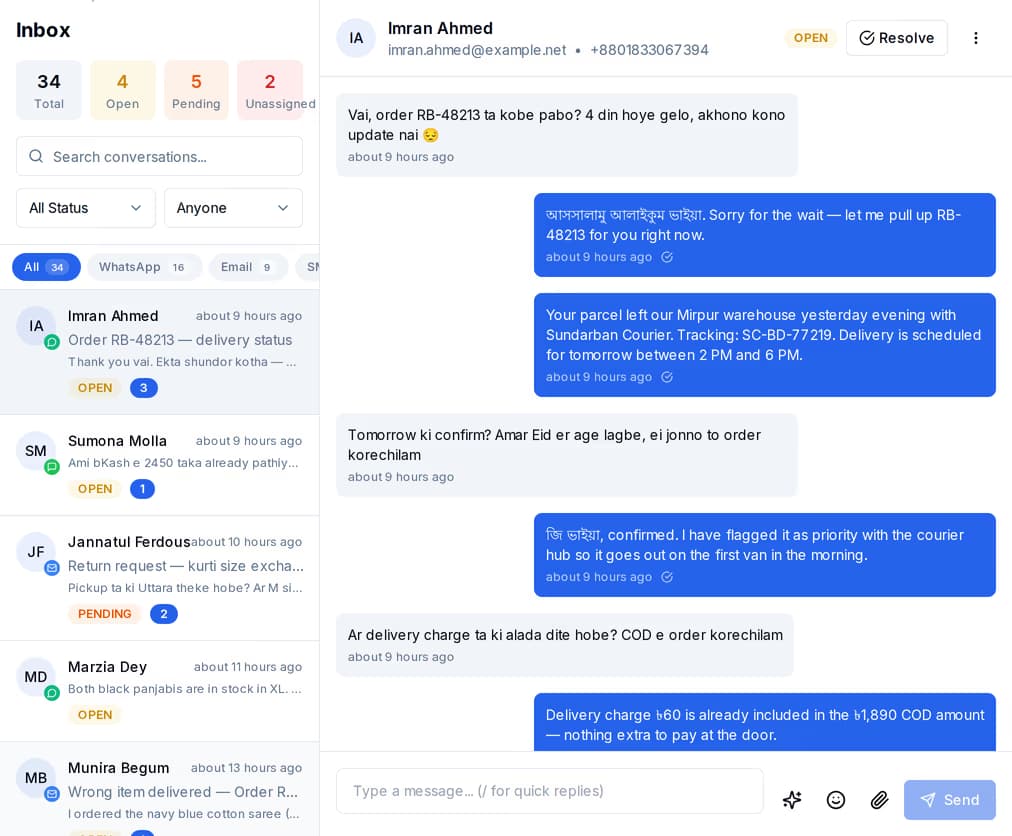
Conversations from every connected channel sit in the same list, newest first. The tabs across the top split them by channel when you want that; most of the time you leave it on All and work down.

The QuickGrow shared inbox: a conversation list mixing WhatsApp, email and SMS threads, beside an open WhatsApp order-tracking conversation.
What your team sees

The whole queue on the left, the customer on the right.

A conversation carries a channel, a status, a priority and whoever owns it. The counts above the list tell you what is open, what is pending and what nobody has picked up yet, so the first thing anyone sees in the morning is the size of the day.

  • Filter by status — open, pending, resolved, closed — or by who it is assigned to, or by channel.
  • Search by subject, and tag conversations as you go so you can find them again by topic.
  • Priority runs low, normal, high and urgent, and stays on the conversation for everyone to see.

A conversation goes through four states, and only four.

There is no separate ticket to raise and no second system to keep in step with the first. The message is the ticket, and it moves through the same four states whichever channel it came in on.

  1. It arrives

    A customer writes on WhatsApp, replies to one of your emails, or texts your number. QuickGrow matches the contact behind it — or creates one — and opens a conversation. Everything that person sends after that joins the same thread.

  2. It gets an owner

    Each connected account can hand new conversations out on a rota, or to whoever has the fewest open right now. Leave it off and the team takes from the unassigned list instead. Whoever it lands on is told by name.

  3. Someone answers

    Reply in the same box you read it in and it goes back out on the channel it came in on. Press / to drop in a saved reply, attach a photo or a document, set the priority, add a tag so you can find it again.

  4. It gets parked, or it gets finished

    Park it as pending while you wait on the customer, and it jumps back to the top of the list the moment they reply. Mark it resolved when it is done. If a resolved customer writes again, that arrives as a fresh conversation — the old one keeps its full history, so nothing is lost.

The bot takes the easy ones. It knows when to stop.

A chatbot flow answers on WhatsApp and SMS: a message, a set of buttons, a menu, a question whose answer it remembers, a branch on what it was told, or a call out to a system of yours. When it reaches the end of what it can do, it hands over.

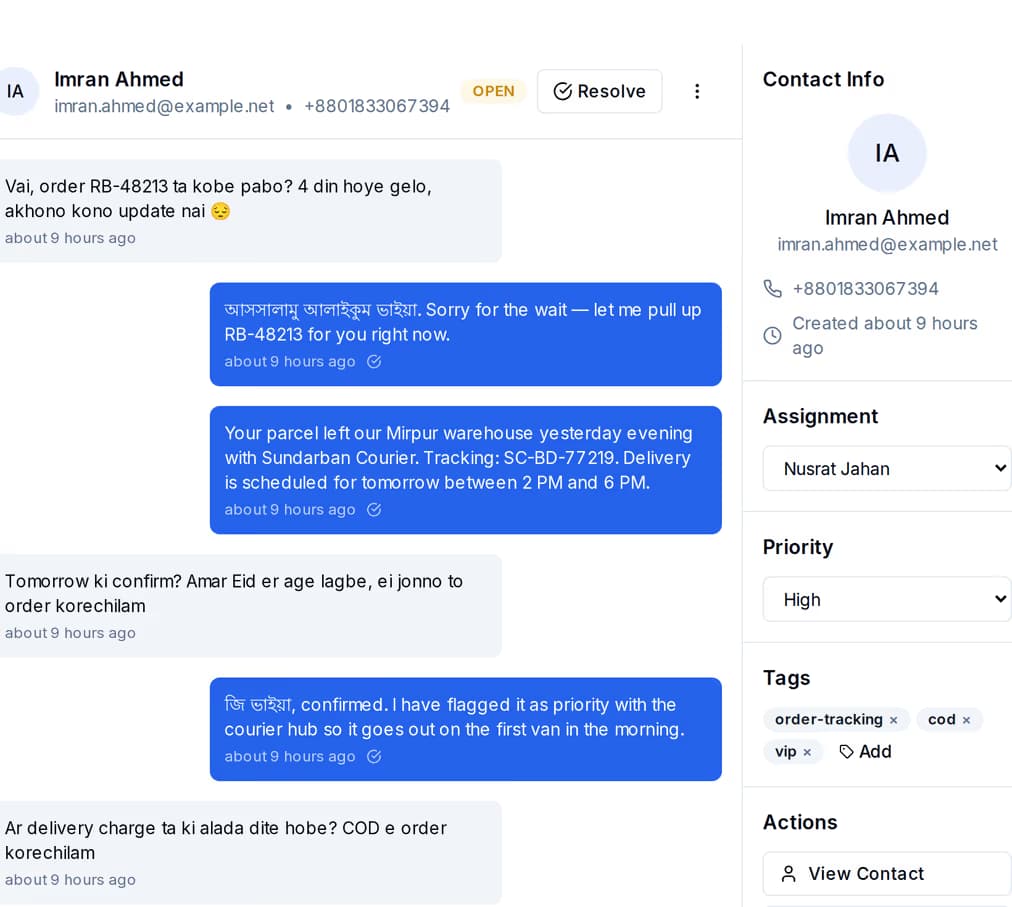
A WhatsApp order-tracking thread open in the QuickGrow inbox, beside the contact panel showing the conversation status, tags and who it is assigned to.
Handover

Mid-chat, to a named person, without the customer starting again.

You decide where the bot steps aside by putting a handoff block into the flow. The bot session ends there, the conversation stays exactly where it is, and a person picks it up with the whole exchange above them.

  • The conversation is assigned the same way any other is — on a rota, to whoever has the fewest open, or left for the team to claim.
  • Whoever it lands on is alerted by name, with the customer and the thread on it.
  • Nothing is lost in the handover: the customer stays in the thread they were already in.

Who can see it, who gets it, who is told about it.

A shared inbox is only shared if the sharing has rules. These are the three that matter, and all three are yours to set.

Who can do what

  • Invite a teammate by email; they set their own password from the invitation, and you can resend or revoke it before they accept.
  • Four roles are ready on day one: Manager, Editor, Analyst and Inbox Agent.
  • Inbox Agent is exactly that — read and reply in the inbox, see contacts, and nothing else.

Who gets the conversation

  • Per connected account, choose a rota, or send each new conversation to whoever has the fewest open and pending ones.
  • Or turn hand-outs off entirely and let the team pull from the unassigned list.
  • Reassign from the panel beside the thread at any point, mid-conversation included.

So nobody misses one

  • A new WhatsApp message, email reply or SMS raises an alert in the app and on the phone.
  • Being handed a conversation alerts that person by name, with the customer on it.
  • A chat waiting for a human is a high-priority alert that carries its place in the queue.

What each channel lets you do on the way back.

Replying is not the same on all three, and the difference matters most when a customer is waiting. This is what changes.

Telegram, Facebook Messenger, Instagram direct messages and the live chat on your own site arrive in the same list once you connect them, each with its own tab.
WhatsAppEmailSMS
Replying in your own wordsWithin 24 hours of their last message. After that, an approved templateAny time — the reply threads onto the subjectAny time
What you can send backText, photos, video, documents and audioText, on your mail server or oursPlain text
Chatbot answers hereYesNoYes
How it is paid forVolume per Meta template category — Utility, Authentication or MarketingBulk and transactional, on your own mail server or oursMasking volume, non-masking volume, or both — metered separately
What it is best atThe back-and-forthLong answers and a record of themReaching a handset with no data on it

Priced on the messages you send, not the people who answer.

Support software that charges per agent punishes you for putting a second person on the inbox. This does not work that way.

The base

One platform fee

The inbox, the chatbot, saved replies, roles and the rest sit behind a single platform fee. There is no charge per agent seat and no charge per conversation, so putting one more person on the inbox costs nothing extra.

Buying volume

Managed volume waives part of it

Buy managed sending on a channel and part of the platform fee falls away. Buy enough across email, SMS and WhatsApp together and it is waived entirely. A longer billing term discounts the fee and the volume on their own separate ladders.

Your own setup

Or bring your own

Already have a mail server, an SMS account or a WhatsApp number? Bring them, pay the platform fee only, and settle the traffic with your provider directly. The inbox works the same either way.

The pricing page builds the plan with you and shows the real blended saving as you go. If you send another business our way, both of you earn credit — see how the referral works.

Before you move your support onto it.

Which channels land in the shared inbox?

WhatsApp, email and SMS are the three most teams run on. Telegram, Facebook Messenger, Instagram direct messages and the live chat on your own site land in the same list once they are connected, with a tab each and a count beside it. A tab only appears once that channel has conversations, so the rail stays short.

Do I need a separate agent licence for each person?

No. Team members are invited from your account settings and there is no per-seat charge for the inbox. Give a new starter the Inbox Agent role and they can read and reply to conversations and look up contacts — nothing more.

Where exactly does the chatbot stop and a person take over?

You put a handoff block into the flow at the point you choose. The bot session ends there and the conversation stays in the inbox with the whole exchange intact, ready for a person. Who it goes to is decided by the inbox itself — on a rota, or to whoever has the fewest open conversations, or left unassigned for the team to pick up. Note that the bot does not currently watch for a customer typing agent or human; put the handoff block where you want the exit to be.

What happens if every agent is busy?

The conversation is queued rather than dropped. The customer is told they are in the queue, everyone on the account gets a high-priority alert with the position, and the conversation sits in the pending list until someone takes it. Agents mark themselves available or away, and only the available ones are handed chats.

Can the bot take the conversation back?

Yes. Once the person is done they can return the chat to the automated assistant, which tells the customer and clears the assignment. It is one action from the same conversation.

Can I answer a WhatsApp message whenever I like?

Within 24 hours of the last message the customer sent you, you can write back in your own words. After that Meta only allows an approved template, which is why WhatsApp is sold by template category. Email and SMS have no such window.

Do saved replies work on every channel?

Each saved reply is tied to the channels you choose and grouped into a category, with a short slash-command of your own naming. Press / in the reply box and the matching ones come up; picking one drops the text into the box so you can change it before it goes.

What happens to a conversation after it is resolved?

It stays, with its whole message history, its tags and the person who handled it. If that customer writes again it arrives as a new conversation rather than reopening the old one, so use tags to tie the two together — and if you are expecting a reply, leave it pending instead of resolved, because a pending conversation does come back to the top of the list on its own.

Put every channel in one inbox and give each question an owner.

WhatsApp, email and SMS in one list, roles for the people who answer, and a chatbot that hands over the moment it is out of its depth.