Your call centre is the tracking system
People phone because nothing told them. Every agent-minute spent reading a status off a screen is a minute the same screen could have sent by itself, for a fraction of the cost.
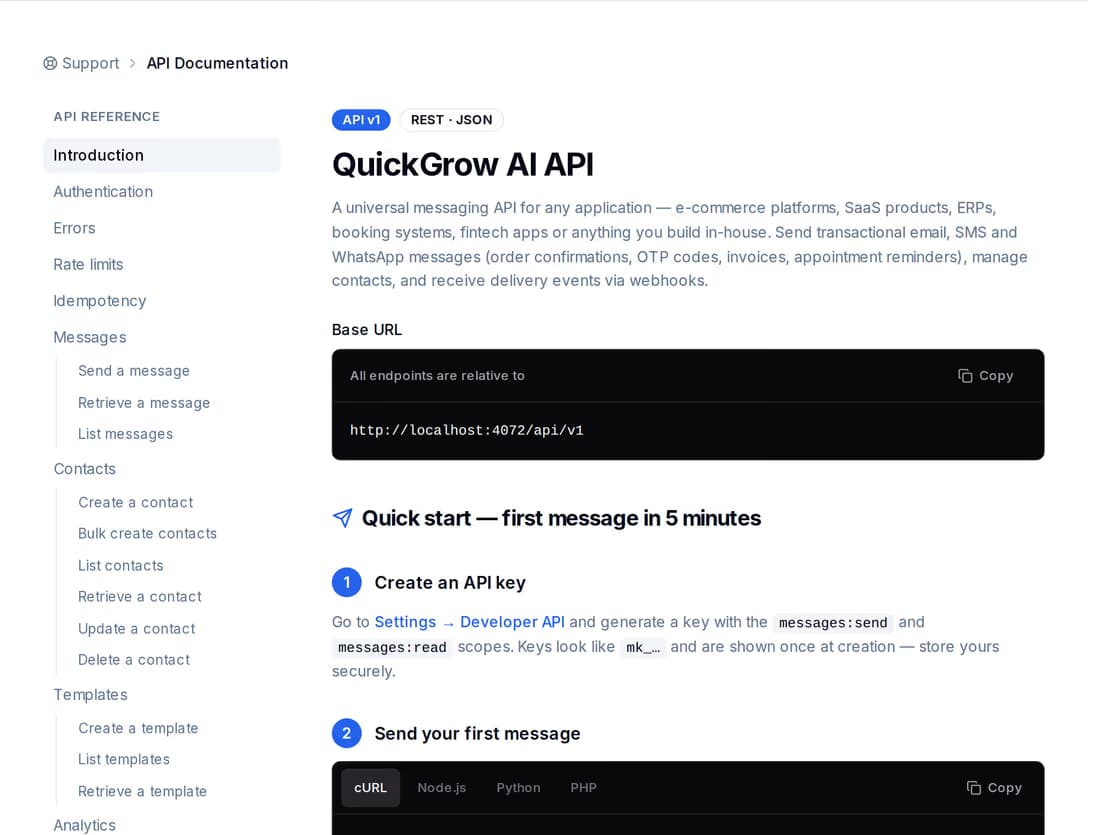
Your system already knows when a parcel is picked up, out for delivery, attempted or delivered. One API call per event turns that into a WhatsApp, SMS or email message to the consignee — and hands you back a delivery status you can store against the consignment.
A courier operation is already full of events: a scan at pickup, a bag assigned to a hub, a rider out on a route, an attempt that failed, a delivery signed for. Every one of those is a moment the consignee wants to hear about, and almost none of them reach anybody outside the operations screen.
People phone because nothing told them. Every agent-minute spent reading a status off a screen is a minute the same screen could have sent by itself, for a fraction of the cost.
Calls from a personal number before every drop. Nothing is recorded, the merchant cannot see what was said, and the customer has no thread to look back at.
A parcel goes out, nobody is home, it comes back. A message before the rider arrives — and one asking for a better time after a failed attempt — is the cheapest way to stop paying for the same delivery again.
There is one send endpoint for all three channels. You choose the channel per event, address the consignee, and either write the message inline or point at a stored template and pass the values. Nobody on your side opens a dashboard.
Settings → Developer API issues a key with its own scopes: sending, reading messages, contacts, templates, delivery statistics. Grant only what your integration uses, and issue a fresh key and revoke the old one whenever you like.
Your system sends one request per parcel event — channel, phone number or email, and the content or the template id with its values. Attach your consignment number and the request comes back carrying it.
The response carries a message id and a status straight away. Email completes on the call itself; SMS and WhatsApp come back queued and move on from there. You can ask for that id again any time.
Register your own endpoint and QuickGrow calls you back when the message is sent, delivered, bounced or failed, so the consignment record updates without anybody polling.
X-API-Key: mk_...

{
  "channel": "whatsapp",
  "to": "+8801700000000",
  "templateId": "out-for-delivery",
  "variables": {
    "name": "Rahim",
    "parcel": "CN-884213",
    "window": "2pm - 5pm"
  },
  "tags": ["out_for_delivery"],
  "metadata": { "consignmentId": "CN-884213" }
}{
"data": {
"id": "9f2a...",
"channel": "whatsapp",
"status": "queued",
"to": "+8801700000000",
"tags": ["out_for_delivery"],
"metadata": { "consignmentId": "CN-884213" },
"createdAt": "2026-08-23T09:00:00.000Z",
"sentAt": null,
"deliveredAt": null,
"failedAt": null,
"failureReason": null
}
}Anything you put in metadata comes back untouched — on the response, on a later status read, and on every callback. Put the consignment number there and you never have to keep a second table mapping message ids to parcels.
All three run off the same endpoint and the same key, so choosing per event costs you one field. WhatsApp comes through the official Meta Cloud API from your business profile; SMS goes out under a branded sender name if you buy Masking volume; email carries the paperwork.
| SMS | |||
|---|---|---|---|
| Fits these events | Out for delivery, rider assigned, delivered, failed attempt | Pickup confirmed, delivery window, any event that must land on a basic handset | Merchant manifests, invoices, proof of delivery, weekly summaries |
| Arrives without mobile internet | No | Yes | No |
| Consignee can reply, and someone can answer | Yes | Yes | Yes |
| Shows your brand as the sender | Your WhatsApp business profile | A branded sender name with Masking SMS | Your own verified domain |
| Needs a template approved by Meta first | Yes | No | No |
| Can carry a file | No | No | Up to 10 attachments, 7 MB in total |
| Sold as | Billed by Meta directly, per category: Utility, Authentication and Marketing | Masking and Non-Masking, each on its own volume slider | Bulk and transactional — your own mail server or ours |
A send is not the same as a delivery, and a courier of all businesses knows the difference. Every message keeps its own status, and the timestamps that go with it.
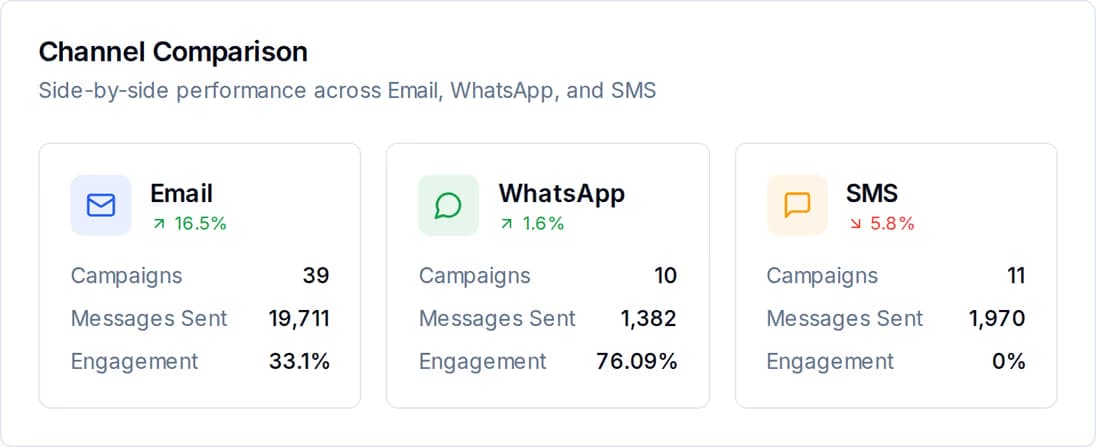
Ask for one message by its id and you get its current status with the moment it was sent, the moment it was delivered, and — if it went wrong — the reason and the code the provider gave. Ask for the list instead and filter it by channel, by status, or by date.
{
  "id": "evt_5c1d...",
  "event": "message.delivered",
  "createdAt": "2026-08-23T09:00:31.412Z",
  "data": {
    "message": {
      "id": "9f2a...",
      "channel": "whatsapp",
      "status": "delivered",
      "to": "+8801700000000",
      "metadata": { "consignmentId": "CN-884213" },
      "deliveredAt": "2026-08-23T09:00:31.106Z"
    }
  }
}Register an endpoint in the portal and subscribe it to the events you want: the message was sent, it was delivered, it bounced, it failed. Only messages sent through the API raise them, so a marketing campaign never floods your operations system.
A sorting-hub integration will fire the same event twice sooner or later — a timeout, a replayed queue, a retried job. Put your own key on the request and a repeat within 24 hours replays the first response instead of sending a second message. The consignee gets told once.
Use the consignment number and the event name as your key. Send it again and you get the original message id back, marked as a replay, with nothing new going out.
Every error comes back with a stable code — a bad phone number, a template that does not exist, not enough balance, the rate allowance exhausted — so your retry logic reads the code, not the wording.
Each key carries its own request limit per minute, and every response reports the limit, what is left, and when the window resets. A peak-hour burst tells you to slow down instead of failing silently.
A key that only sends cannot read your contacts. Issue one per system — hub scanner, rider app, merchant portal — and switch one off without touching the others.
An update the customer cannot answer just moves the call to a different hour. When a consignee replies to a WhatsApp or SMS update, the reply opens a thread your team can actually work.
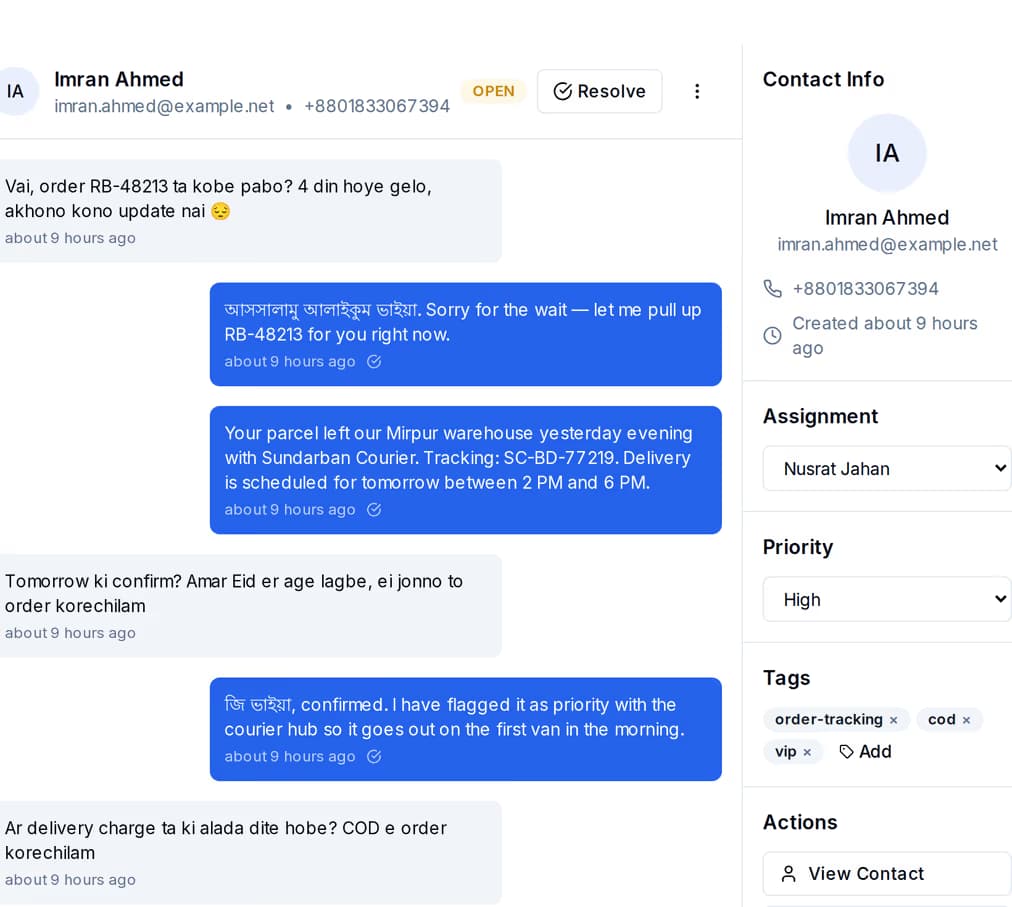
WhatsApp, SMS and email threads land in the same place, next to the contact record and its tags. Anyone rostered can pick a thread up, assign it, answer it and resolve it — instead of the whole thing depending on whoever holds the phone.
Two parts: a platform fee, and the messages you send. Buying managed volume on SMS and email waives part of the platform fee, and buying enough waives it entirely. WhatsApp carries no fee of ours at all — Meta bills you directly for it, at Meta's own rate. Already have an SMS account or a mail server of your own? Bring it and pay the platform fee only. A longer billing term discounts both, on separate ladders.
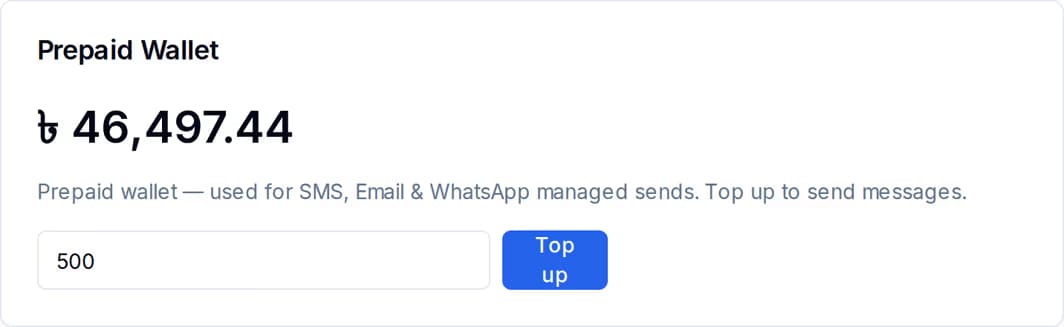
Before you know your real SMS and email volume, set the sliders low and let the wallet catch the rest: sends beyond what you bought are billed at the base rate from the balance. Move the sliders up once the parcel count settles. WhatsApp has no slider and no wallet — Meta bills you directly for it, at Meta's own rate, with no markup from QuickGrow. Volume and prices for SMS and email are in BDT throughout.
One HTTPS request per parcel event, with your key in a header. There is one send endpoint for all three channels, so the difference between an SMS and a WhatsApp update is a single field. If you want the delivery outcome pushed back to you, add an endpoint of your own and subscribe it in the portal — otherwise you can ask for the message id again whenever you need the status.
Put a key of your own on the request — the consignment number and the event name work well. A repeat of that key within 24 hours replays the original response and marks it as a replay, so no second message goes out. Reuse the same key against a different endpoint and you get a clear conflict error rather than a surprise send.
Each message keeps its own status: queued, sending, sent, delivered, opened, clicked, bounced or failed, with the timestamp for each step it reached. A failure carries the reason and the provider code. You can read that by message id, list messages filtered by channel and status, or have QuickGrow call your endpoint when a message is sent, delivered, bounced or failed.
Create a key, send one message from your staging hub, and watch the delivery status come back before you touch the production integration.
 CyberCraft BangladeshQuickGrow AI
Run every channel from one platform. Bring your own SMTP, SMS gateway, and WhatsApp number — or use ours.
See pricing →