Subject lines worth testing
Ask for a batch and get A/B variants ready to drop into a test. Paste one you already wrote and it will tell you what is weak about it before your whole list sees it.
Tell QuickGrow what a message is for and get back a subject line, body copy for email, SMS or WhatsApp, or a whole email template you can edit like any other. Everything it writes is a draft. Nothing goes to a customer until you send it.
Email · welcome · friendly · short · call to action
Replies go to [EMAIL_1]
Hi {{firstName}} — thanks for joining. Your first three steps are in one place, so you can send your first campaign today rather than next week.
Scored and filed · yours to editThese are fields, not prompt engineering. You pick the channel, say what the message is for and who it is going to, choose a tone and a length, and the draft comes back with alternatives so you are choosing rather than accepting.
Ask for a batch and get A/B variants ready to drop into a test. Paste one you already wrote and it will tell you what is weak about it before your whole list sees it.
Say what the email is for, who it is going to, roughly how long it should be, and which of a call to action, personalisation, urgency or social proof to work in.
Same brief, tighter output. For SMS you set the character ceiling and whether a link goes in, so the draft is the length you meant to pay for.
Give it the context and a style, ask for as many as you want, and pick the one that sounds like a person from your shop wrote it.
Paste copy you already wrote along with the goals you want it to hit — shorter, warmer, clearer, more direct — and get it back rewritten against those goals.
One prompt returns a finished email: subject, preheader, the HTML, a plain-text version, and a section list you can edit piece by piece.
There is no separate AI product to learn. It is a step inside the campaign and template screens you already use, and you can ignore it completely.
Channel, purpose, audience, tone, length. Optionally the product you are selling, or copy you want it to work from.
You get the main version plus the alternatives it produced, so you are picking between options rather than accepting one answer.
Edit by hand, re-tone every line in a template at once, or regenerate one section against an instruction and leave the rest alone.
The draft becomes an ordinary campaign or template that you own. QuickGrow never sends something the AI wrote on its own.
The template writer is the part worth trying first. It does not hand you a wall of text — it hands you a structured email with named sections, so changing your mind later costs one instruction instead of a rewrite.
Subject lines and full templates are an email idea, so that is where they live. Everything else works across all three channels.
| SMS | |||
|---|---|---|---|
| Subject lines, plus A/B variants | Yes | No | No |
| Body copy from a short brief | Yes | Yes | Yes |
| A length ceiling and link control | No | Yes | No |
| Call-to-action lines | Yes | Yes | Yes |
| Rewrite copy you already have | Yes | Yes | Yes |
| Readability, tone and spam-likelihood score | Yes | Yes | Yes |
| A complete template with layout and sections | Yes | No | No |
An AI writing to your customer list is a risk if nobody is watching it. Two things watch it: personal details are taken out of the request before it leaves, and campaign copy is scored and filed the moment it returns.
Email addresses and phone numbers found in the text you send are swapped for placeholders before the request leaves QuickGrow. Merge fields stay as merge fields and are filled in at send time, from your own data.
Campaign copy is checked for threatening or hateful language, for contact details that leaked into the text, and for the claims that get marketing accounts shut down — guaranteed results, no risk, act now.
A clean draft is marked approved. A borderline one is marked pending review and your admins are notified so a person decides. A bad one is marked rejected, with the reasons attached.
Your plan comes with a number of AI requests a day and a size budget to go with it. There is a usage read-out, and the writer tells you when you have hit the ceiling rather than quietly failing.
Every generated draft is stored with what was asked for, what came back, its score and who reviewed it — so “where did this sentence come from?” still has an answer six months later.
Writing is the main job, but the same models sit behind two other decisions that cost campaigns money — who you send to, and when. The shared inbox and the chatbot use them too, to read what an inbound message is asking for and suggest a reply.
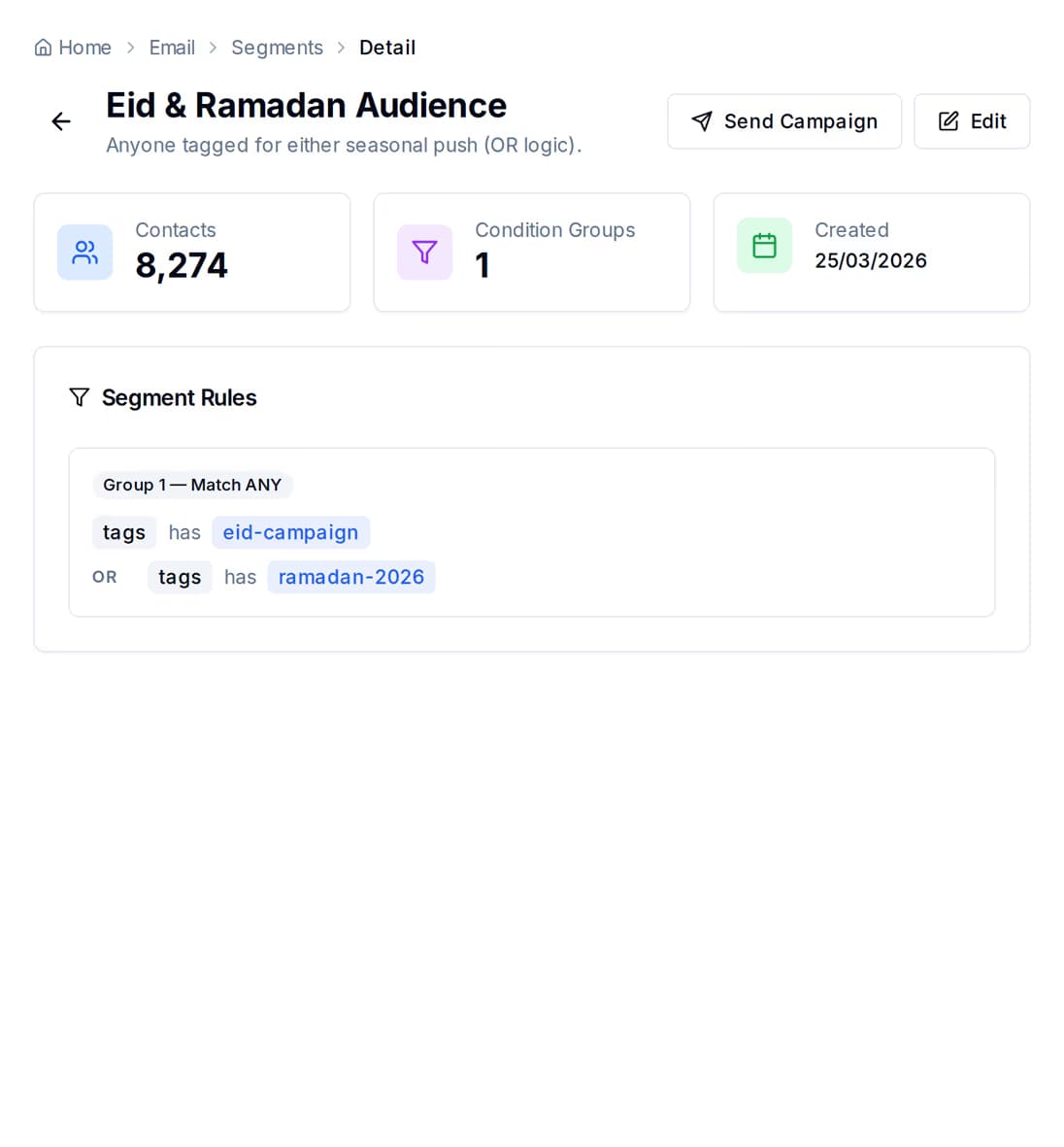
Type the goal in your own words — people who have gone quiet, people who joined this month — and you get segment rules back rather than a black box. You can read them, edit them, and see how many contacts match before anyone gets a message.
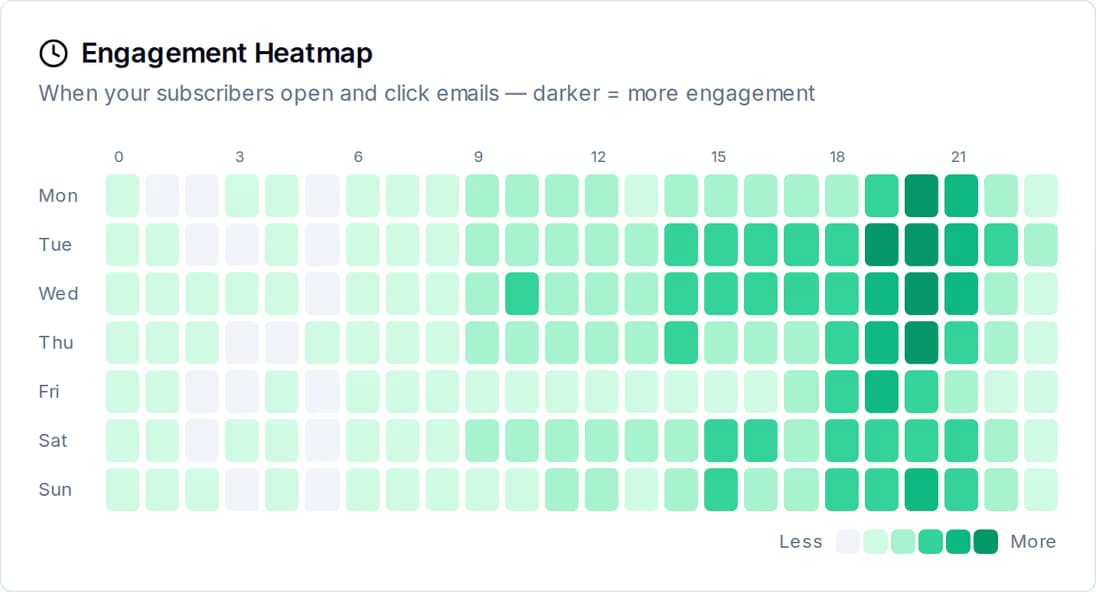
QuickGrow reads thirty days of your own opens, clicks and deliveries and recommends when to send — for the account, for one campaign, or contact by contact. The engagement heatmap is that same data, laid out so you can argue with the recommendation.
It does not get your contact list. Email addresses and phone numbers found in the text you send are replaced with placeholders before the request leaves QuickGrow. Personalisation happens afterwards: the draft carries merge fields such as the contact first name, and those are filled in from your own database at send time.
No. The writer produces drafts. A draft becomes a campaign only when you put it in one, and that campaign goes out only when you send or schedule it. If you want an assistant that can genuinely operate campaigns, that is a separate feature — AI agents — and even there, sending stops for a fresh confirmation from you.
It is filed as pending review rather than passed through quietly, and your admins are notified that something is waiting. A person on your team approves it, or rejects it with a reason. Clean drafts are marked approved automatically; the worst are marked rejected outright.
Write the campaign yourself when you know what to say. Let QuickGrow start it when you do not.
 CyberCraft BangladeshQuickGrow AI
Run every channel from one platform. Bring your own SMTP, SMS gateway, and WhatsApp number — or use ours.
See pricing →