Triggered by the event, not a schedule
Your checkout, your dispatch job, your payment handler makes one call at the moment the thing happens. There is no list to build, no campaign to set up and nobody has to remember to press send.
Order confirmed. Out for delivery. Payment received. Card declined. Nobody chases a newsletter, but everybody chases an order — so these messages have to go the moment the thing happens, on a channel that suits them, exactly once, with a record you can read back afterwards.
Sending login codes or two-factor prompts? Those have their own page — one-time codes and verification.
A campaign tool is built to send a lot of messages to a lot of people at once and tell you how the batch did. A transactional message is the opposite shape: one person, one event, and the only number that matters is whether that single message landed. QuickGrow treats it that way.
Your checkout, your dispatch job, your payment handler makes one call at the moment the thing happens. There is no list to build, no campaign to set up and nobody has to remember to press send.
Every send returns the id of that one message. Read it back later for the state it reached, the time it reached it, and the reason and code if it failed — so support answers “did the receipt reach me?” from the record instead of guessing.
Connections drop mid-request. Send the same call again with the same retry key and QuickGrow replays the original response for 24 hours rather than sending again, so a bad network never turns into two confirmations and two charges.
Four steps, and only the first one is set-up. After that a message is one call and everything you need to know about it is a read.
Create an API key and give it only what the job needs. Sending, reading message status and managing webhooks are three separate permissions, so the service that sends order confirmations never carries the right to export your contacts.
Post the channel, the recipient, and either the wording inline or a template id with the values to fill in. An email send can carry files — up to ten, seven megabytes in total — so the invoice travels with the confirmation rather than in a second message.
The response carries the message id and the state it is in. From there, either read that id when you need it or subscribe to webhooks and let QuickGrow tell you the moment it is sent, delivered, failed or bounced.
List your history filtered by channel, state and date, or ask for the totals per channel over a period. Nothing depends on your endpoint being up: if a webhook never reached you, the record is still sitting there to read.
One key header authenticates every request. The send is a single call; everything after it is a read against the id that call gave you.
X-API-Key: mk_…

{
  "channel": "email",
  "to": "[email protected]",
  "templateId": "order_confirmed",
  "variables": {
    "name": "Rumana",
    "orderId": "A-4471",
    "eta": "Tue 27 Aug"
  },
  "attachments": [
    { "filename": "receipt.pdf",
      "content": "JVBERi0xLjQK…" }
  ],
  "metadata": { "orderId": "A-4471" }
}

# same shape for "sms" and "whatsapp"
{ "data": {
  "id": "msg_9fA2",
  "channel": "email",
  "status": "delivered",
  "createdAt": "2026-08-24T11:02:04Z",
  "sentAt":    "2026-08-24T11:02:07Z",
  "deliveredAt": "2026-08-24T11:02:11Z",
  "failedAt": null,
  "failureReason": null,
  "failureCode": null,
  "metadata": { "orderId": "A-4471" }
} }

# list: GET /api/v1/messages?status=failed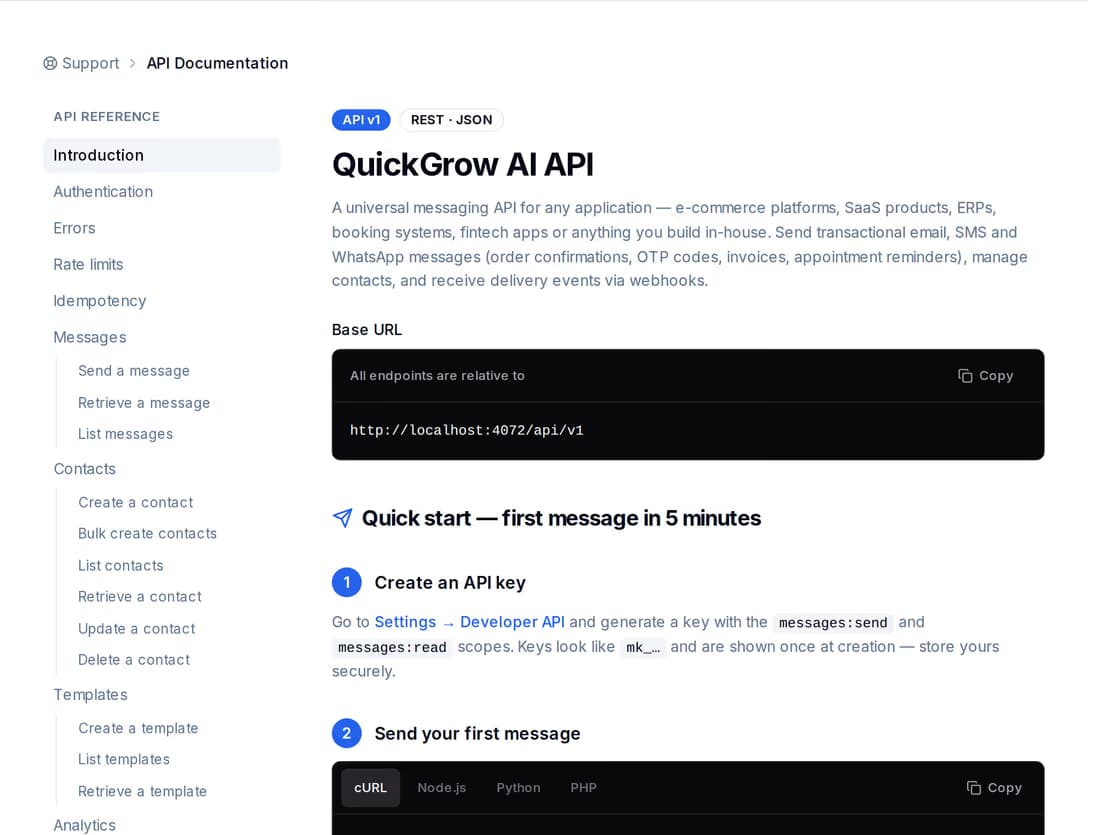
Write the confirmation once as a template in QuickGrow and send it by id with the values filled in. When somebody wants to reword the delivery message or add a line about returns, they edit the template — nobody waits for a release. Every endpoint, field and error is written down inside the product and published as a machine-readable specification you can import into your own tooling.
QuickGrow will not switch channels behind your back or swallow a problem to keep a graph looking tidy. When a send fails it fails visibly: the message keeps the reason and the code, and a signed webhook lands on your endpoint so your system can decide what happens next.
Sent, delivered, failed and bounced. Only the messages you sent through the API raise them, so your endpoint never gets buried under campaign traffic.
Each delivery is signed with a secret only you and QuickGrow hold, and you can roll that secret whenever you want. Fire a test event at a new endpoint before you rely on it.
An endpoint that does not answer is tried again four more times, spread across the next half hour, and every attempt is recorded for you to look at.
A failed message stops there. If you want the same update to go out on another channel, your code makes that call — which means you choose the wording, the timing and whether it happens at all.
{
  "id": "evt_7c1e…",
  "event": "message.failed",
  "createdAt": "2026-08-24T11:03:02Z",
  "data": { "message": {
    "id": "msg_9fA2",
    "channel": "sms",
    "status": "failed",
    "failedAt": "2026-08-24T11:03:01Z",
    "failureReason": "…",
    "failureCode": "…",
    "metadata": { "orderId": "A-4471" }
  } }
}

# message.sent · delivered · failed · bounced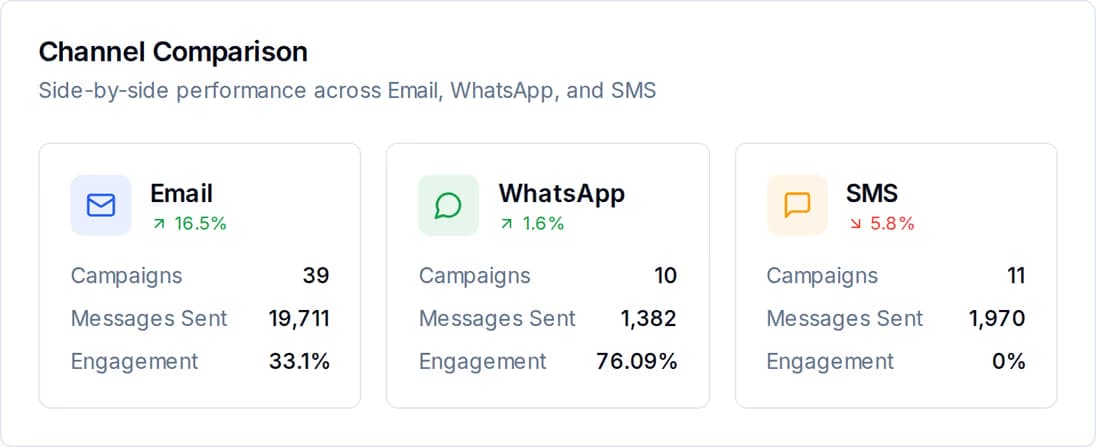
The state of a message is not a report you wait for overnight — it is a field on the message itself. Read one by id, list them filtered by channel, state and date, or ask for the totals per channel over a period and get sent, delivered, opened, clicked, bounced and failed back in a single response.
All three go out from the same endpoint and report the same way, so the choice is a field in your request rather than a second integration. What genuinely differs is what each channel needs from you before it will carry the message.
| SMS | |||
|---|---|---|---|
| Suits | Confirmations, receipts, invoices, statements | Short, urgent updates to a phone | Replies inside a conversation the customer started |
| Can carry a file, like an invoice | Yes | No | No |
| Goes out at any hour of the night | Yes | No | No |
| Needs consent recorded against that contact first | No | Yes | No |
| Per-contact cap and cooldown apply | No | Yes | Yes |
| Only within 24 hours of their last message to you | No | No | Yes |
| Who it appears to come from | Your verified domain, with your own sender name and reply-to | Your branded sender name once approved — the default sender until then | Your connected WhatsApp Business number |
| Status you can read back per message | Yes | Yes | Yes |
| Delivery webhooks | Yes | Yes | Yes |
| Bring your own provider, or use the managed one | Yes | Yes | Yes |
The night-time hold and the per-contact caps are there because a phone at 2am is a complaint waiting to happen. They are the reason an order confirmation belongs on email and a delivery-is-here alert belongs on SMS during the day — and QuickGrow tells you plainly when a send was held rather than pretending it went.
A campaign goes to a list on a schedule and is measured as a batch. A transactional send is one call about one event, made by your system at the moment it happens, and measured as a single message. They land in the same message history, so you can still see the whole picture — but only API sends raise webhooks, so your endpoint is not flooded by marketing traffic.
Not if you send a retry key with it. Repeat the same request with the same key inside 24 hours and QuickGrow replays the original response rather than sending again, so a dropped connection costs you nothing. Reuse the same key on a different endpoint, or while the first request is still running, and you get a clear conflict back instead of a surprise.
Yes, on email. Send the file with the message, up to ten files and seven megabytes in total once decoded. Go over that and the call comes back straight away with an error that names the limit, rather than being accepted and then failing somewhere you never look. SMS and WhatsApp sends cannot carry files, so link to the document instead.
Create an account, make a scoped key, and post your first order confirmation. One endpoint for three channels, and a record of every message you can read back.
 CyberCraft BangladeshQuickGrow AI
Run every channel from one platform. Bring your own SMTP, SMS gateway, and WhatsApp number — or use ours.
See pricing →