Patients forget
A slot booked three weeks ago is a slot nobody remembers. The chair sits empty and the queue behind it does not move up.
Remind patients before they are due, tell them the moment a report is ready, and answer the reply on the same screen — over SMS, WhatsApp and email, from one patient list.
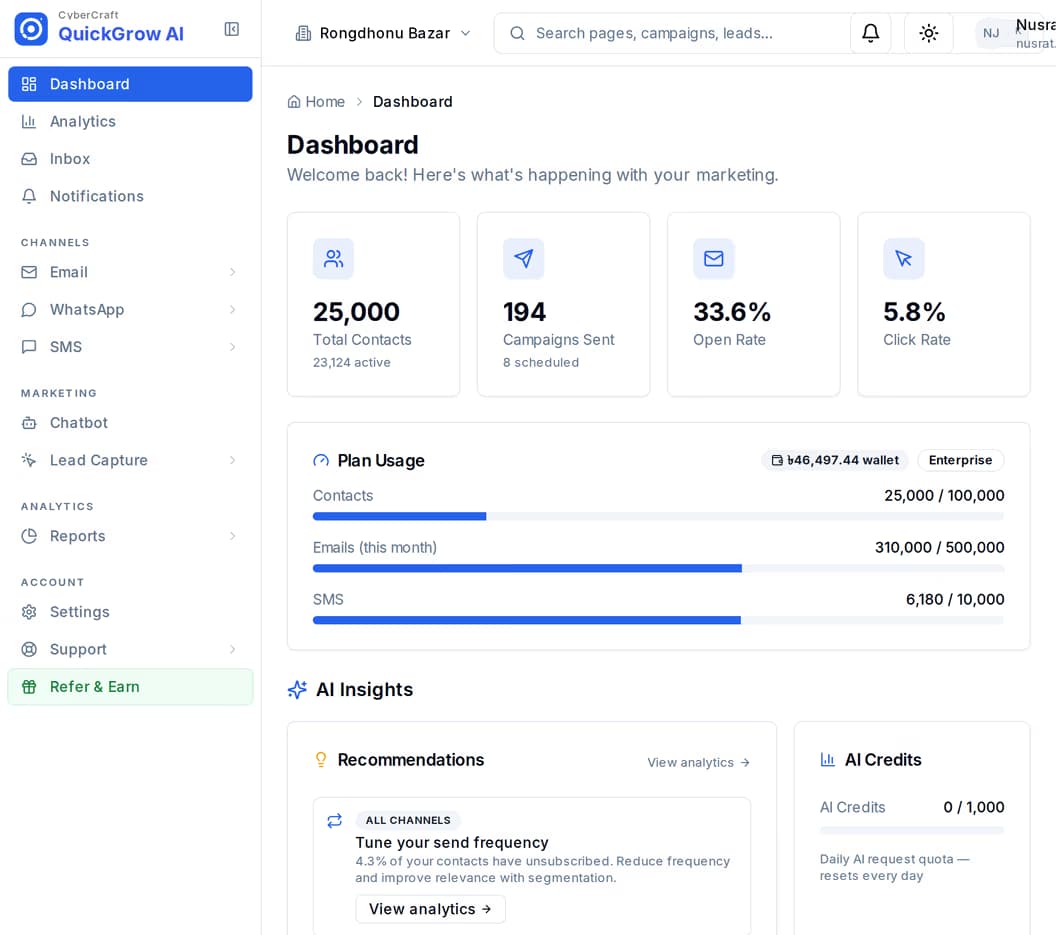
Most of what a clinic desk does all day is repeat the same four sentences. None of it needs a person, and all of it costs you a slot when it does not happen.
A slot booked three weeks ago is a slot nobody remembers. The chair sits empty and the queue behind it does not move up.
The same call, twenty times a day, for a result that has been sitting at the counter since morning.
The review visit, the repeat test, the medicine reminder — everyone agrees they matter and nobody has time to make the calls.
One number gets the SMS, someone’s personal WhatsApp gets the photo, and the clinic address gets the email. Nobody sees all three.
A reminder is not a broadcast — it is tied to one patient’s date. You put the date on the record, say how long before it should go out, and the schedule does the rest.
Appointment date, test date, review date — each patient carries their own dates as fields on their contact record. Import them from a spreadsheet, type them in, or have your practice software write them in over the API.
Choose a date-based trigger and say how many days before or after that date the journey should start. One day before the visit, seven days after a test, thirty days before a repeat prescription — same mechanism each time.
Add the sends: SMS, WhatsApp or email, from a saved template with the patient’s name and time filled in. Put a wait between steps for a second nudge, and a condition branch for “only if they have not confirmed”.
The schedule checks every minute and starts the journey for the patients who are due. Each patient enters a given reminder once per day, so a duplicate row in your list does not mean a duplicate message.
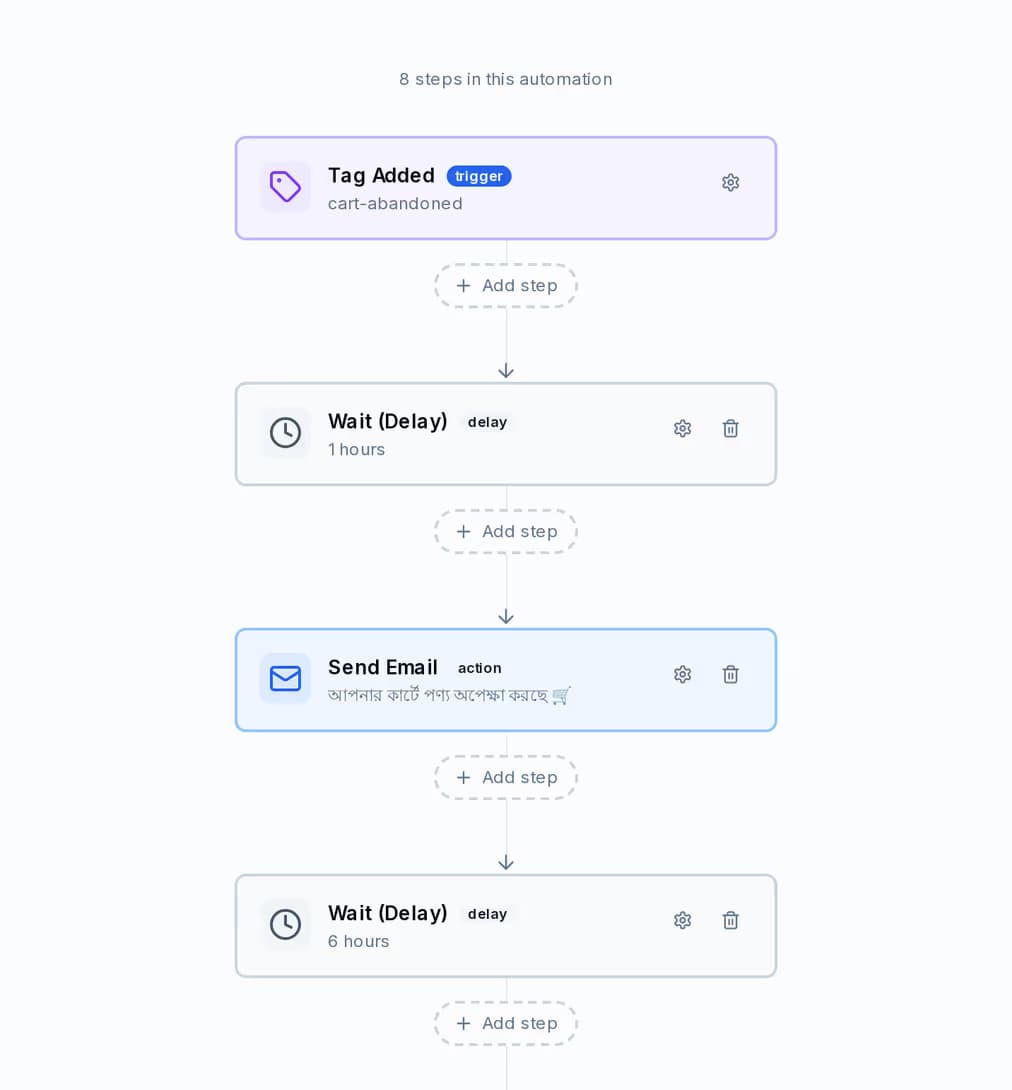
Trigger, wait, send, branch. The canvas below is a cart-recovery journey from the demo workspace, but an appointment reminder is built from exactly the same blocks — which is the point. Learn it once and every other reminder in the clinic is twenty minutes of work.
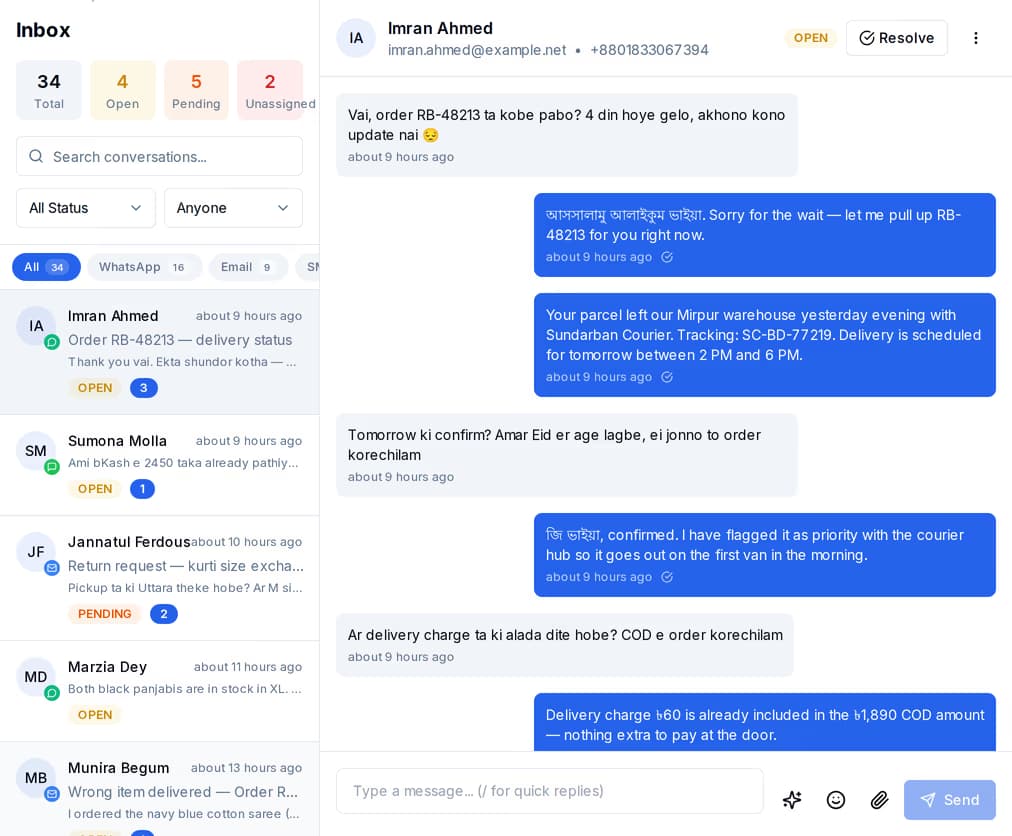
Every inbound message — SMS, WhatsApp or email — becomes a conversation in one list, whichever channel it arrived on. The desk works the list instead of three phones, and the thread stays with the patient record it belongs to.
The three channels are not interchangeable, and the difference matters most for the messages a patient is waiting on. This is what each one actually does.
| SMS | |||
|---|---|---|---|
| Reaches a patient with a basic handset | No | Yes | No |
| Can start a conversation cold | Approved template only | Yes | Yes |
| Sender the patient recognises | Your business number | Branded sender name with Masking SMS | Your own domain |
| Room for detail and attachments | Short, with buttons | A line or two | Yes |
| Reply lands in the shared inbox | Yes | Yes | Yes |
| Held back overnight | 9pm to 8am | 9pm to 8am | Sends any hour |
QuickGrow is a messaging system, not a medical records system, and it holds no health certification of any kind. Treat it as the layer that tells a patient to come in — never as the place the clinical detail lives.
None of these need a person once they are built. Between them they are most of what the desk repeats every day.
One the day before and one on the morning of, from the appointment date on the record. A condition branch drops the patient who already confirmed.
Your lab system calls the API when the result is signed off, and the alert goes out that minute — a WhatsApp template, or SMS for a patient without it.
Seven days after the visit, a check-in. Thirty days before a repeat test is due, a nudge to book it.
Build a segment with the rule builder — patients tagged for a screening, not seen in twelve months — and send the recall to just them.
One list for every inbound message across the three channels, assigned to the person on duty and resolved when it is done.
An opt-out reply is captured and flagged. Withdrawing consent is a step someone takes; from then on every campaign skips that patient automatically.
You put the date on the patient’s contact record as a field — imported from a spreadsheet, typed in, or written by your own software through the API. A date-based automation then starts a set number of days before or after that date. The schedule checks every minute and enters each patient at most once a day, so a duplicated row does not become a duplicated message.
The reply becomes a conversation in the shared inbox, whichever of the three channels it came in on. Anyone with inbox access can pick it up, assign it to a colleague, answer with a saved quick reply and mark it resolved. On WhatsApp a reply opens a 24-hour window in which you can write freely; outside that window only an approved template can go out. If the reply is STOP or UNSUBSCRIBE it is flagged for your team to act on — on SMS that removal is not automatic today, though once done every later campaign skips them.
WhatsApp first if the patient uses it: a utility template is the category meant for account and order updates, and it is delivered without needing an open conversation. Fall back to SMS for a patient on a basic handset — Masking SMS puts your clinic name in the sender field so it does not look like spam. Use email when the document itself is what you are sending. Bear in mind both SMS and WhatsApp are held back between 9pm and 8am, so a result signed off late at night goes out first thing.
Build one reminder and see what a week without “is my report ready?” looks like. You pay a platform fee plus the channels you actually send on — and buying volume waives part of the fee.
 CyberCraft BangladeshQuickGrow AI
Run every channel from one platform. Bring your own SMTP, SMS gateway, and WhatsApp number — or use ours.
See pricing →