
Growth tools

Three ways to ask. One test that decides.

A landing page you publish from QuickGrow, a sign-up form you paste into a site you already have, and an on-site popup — plus an A/B test that ends by writing the winning version onto the live page for you.

Landing pagesEmbedded formsOn-site popupsWinner written live
What you paste into your site
your page
<!-- a sign-up form, drawn right here -->
<script
  src="/api/v1/forms/widget.js"
  data-form-id="f_9fA2" async
></script>

<!-- a popup, over the whole page -->
<script
  src="/api/v1/popups/widget.js"
  data-popup-id="p_41Kd" async
></script>

Copy each line from the form or popup itself. Everything after that is changed here, not on your site.

Start from one of three templates. Publish the same day.

A landing page is the one tool here that needs nothing of your own — no website, no developer, no hosting. Pick a template, replace the words, choose the short name it lives at, and press publish. What you get back is a link you can put in a bio, an ad or a message.

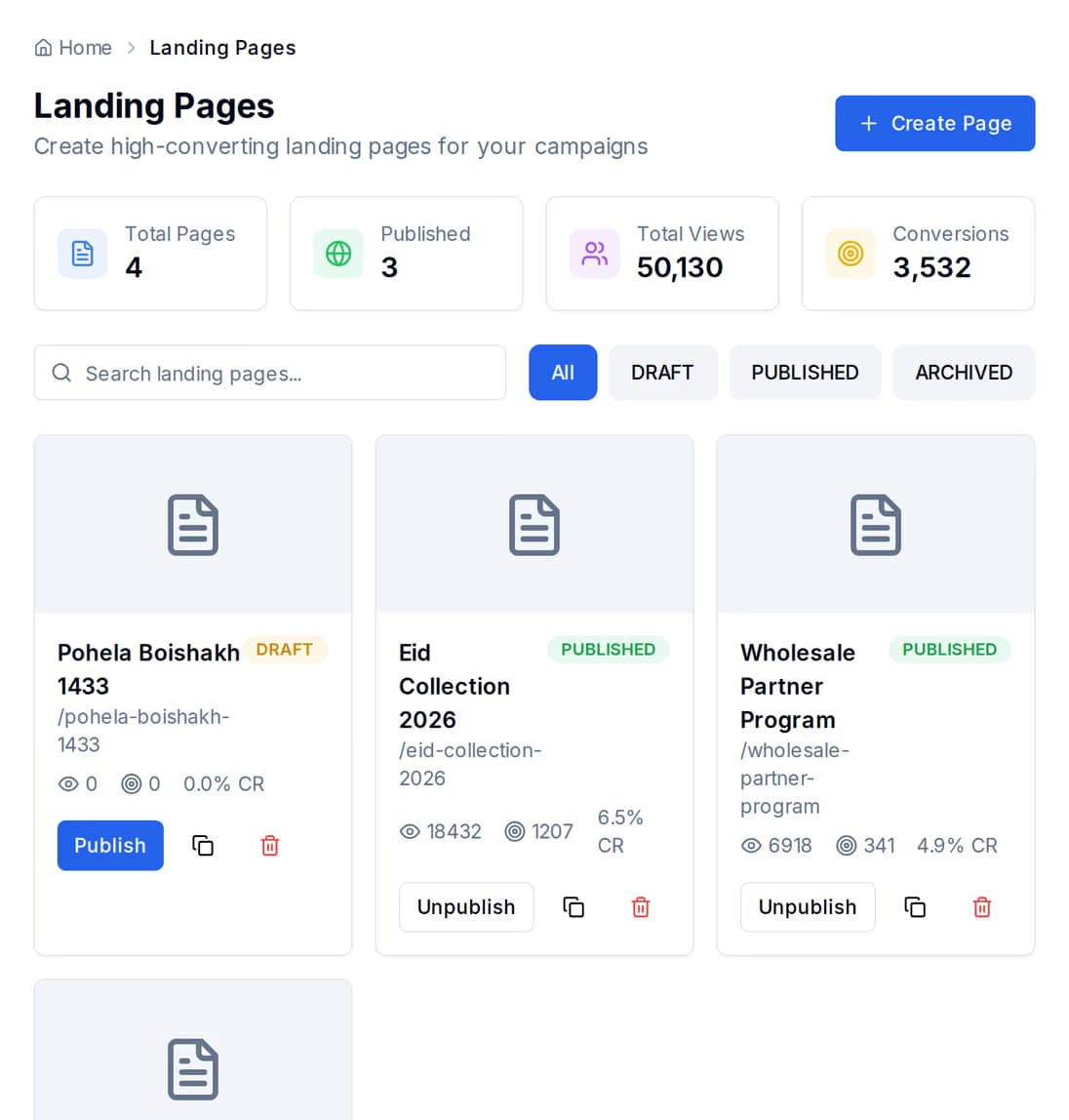
The landing pages list: each page with its status, its published web address, and the views and sign-ups it has collected.

Publish, unpublish and duplicate from the list.

Pages live in one list with their status and their numbers beside them, so the page that is working and the page that is not are visible in the same glance. Nothing you do to a page is one-way.

  • Publishing gives the page a QuickGrow web address built from the short name you pick, and starts counting views on it
  • Unpublish puts a page back to a draft without losing it; deleting it takes it out of the list and off the web, and it stops being served straight away
  • Duplicate makes a full copy as a fresh draft, which is how you try a rewrite without touching the page people are already visiting
Three templates ship with the product. Each one is a starting point — the wording and the blocks are yours to change.
What it is forWhat it starts you with
Lead Capture ClassicCollecting sign-ups for a list or an offerA headline block, a reasons-to-join block, and a sign-up form
Product LaunchAnnouncing something new and building a waiting listA headline block, a countdown, and a call to action
Webinar RegistrationAn event, a class or a demo people sign up to attendA headline block, a what-you-will-learn block, and a registration form

The test does not just report. It rewrites the page.

Most tools show you two columns of numbers and leave both the decision and the copy-and-paste to you. Here, ending a test is the last thing you do: if the new version won, its content is written onto the live page. That is the difference between having two versions and actually picking one.

Ending a test

The winner becomes the page

Name the version that won and end the test. If it is the new version, its content replaces what was live — you do not go back and re-edit the page by hand, and there is no window where the winning copy is decided but not yet up.
What you are shown

Rate, gap, and whether it counts yet

Views and sign-ups are kept separately for each side, with the sign-up rate for each, the percentage difference between them, and a check on whether that difference is big enough to trust. It also names the version it would pick, so a close result reads as close instead of as a win.

While it runs

Start it, pause it, come back to it

A test runs from the moment you create it, with the new version, its content and its share of traffic set on the way in. Pause it and pick it up later, rename the version, or throw the test away and start again. Tests are listed together so you can see what is open.

One line of code, and the form is on your own site.

The script we serve is a small, self-contained file — no libraries pulled in behind it, nothing to install, nothing for you to keep up to date. It reads which form it belongs to, draws the fields where you pasted it, and posts every answer back here.

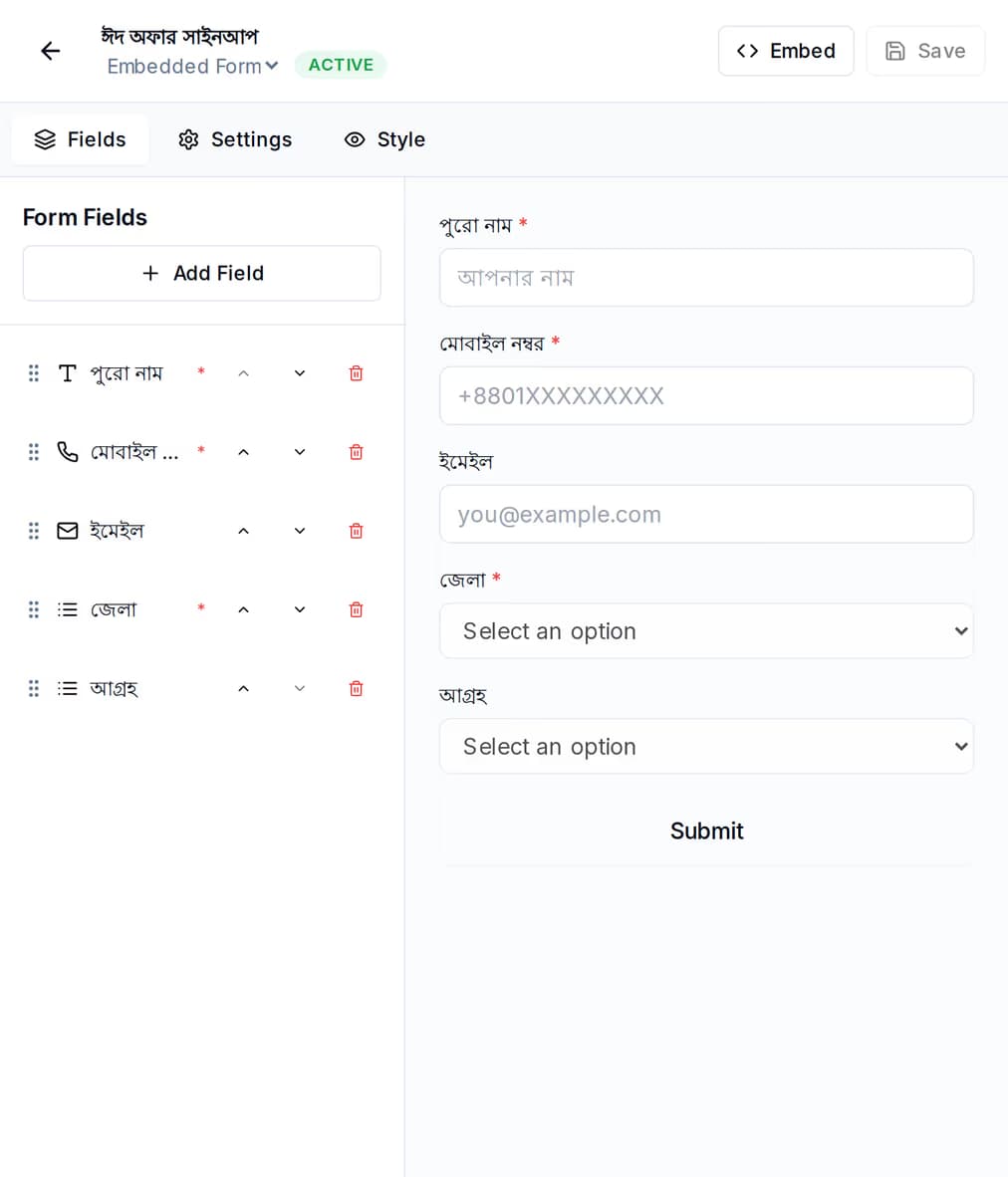
The form builder: the field list on the left beside a live preview of the sign-up form it produces, with the form marked active.

Change the form here. Your website is never touched again.

Your web developer gets involved exactly once, to paste one line. After that the fields, the button text, the thank-you message and whether the form runs at all are all settings on this side.

  • Copy the snippet from the form itself — one script line that names the form, ready to paste where you want the form to appear
  • Prefer a frame? The same form has its own address you can drop into an iframe instead
  • Fields for a short answer, an email address, a phone number, a number, a dropdown or a long answer, each with its own label, hint text and a required mark

Five formats, and its own set of numbers.

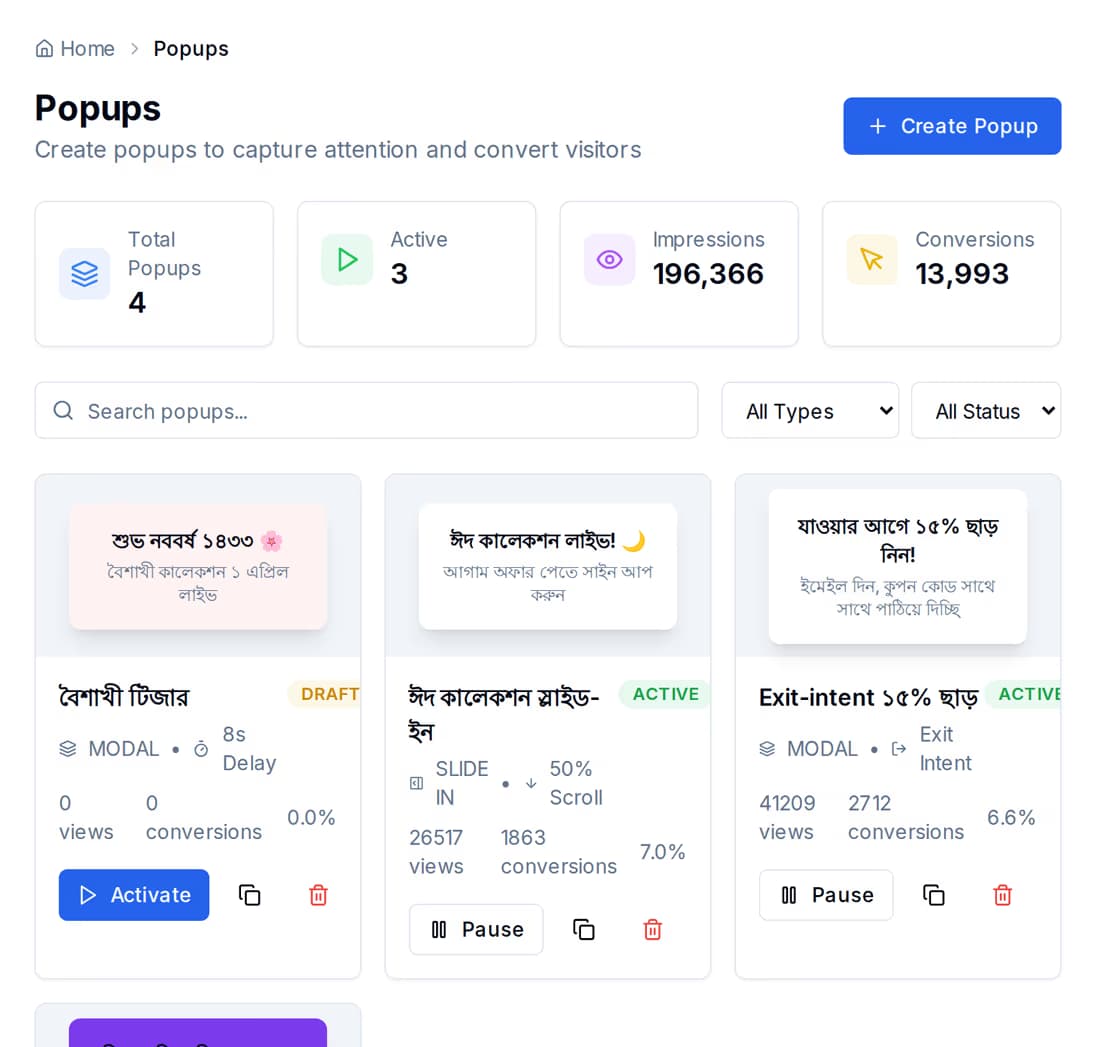
A popup here is a thing in its own right, with its own list, its own on and off switch and its own script — not a setting buried inside a form. It reports three separate events, so an offer nobody wants is obvious rather than hidden inside one blended figure.

The popups list, showing each popup with the impressions, conversions and conversion rate it has earned.

Shown, closed, taken — three counts, not one.

The script fetches the popup settings, draws it, and reports back separately when it was shown, when someone dismissed it, and when someone took the offer on the button. The rate is worked out from the first and the last.

  • A box in the middle of the screen, a slide-in from the corner, a bar along the top, a full-screen message, or one set into the page
  • It appears when the page loads, or after a wait you set — see the questions below for what the on-site script honours today
  • Once per visit: the browser remembers it has been shown, so someone reading three of your pages is not asked three times

What an answer does — and what it does not do on its own.

Worth knowing before you build a plan around it. An answer that comes in is stored against the form that collected it, the counts move, and your team is alerted. It does not turn itself into a contact, and it does not start an automation by itself. Anyone who tells you otherwise is describing a product you have not bought.

What happens by itself

It is kept, counted and flagged

Every answer is stored with the form it came from and when it arrived, and you can read the lot back a page at a time. The sign-up count and the rate move as it lands, and an alert goes to your team so nobody has to sit refreshing a list to notice.

What you do next

Bring those people into your contacts

Read the answers back, then add those people to your contact list. Importing a list is one of the things that can start a welcome journey, so the first message still sends itself — it just starts from the import rather than from the form.

The ones that decide it.

Can I put my landing page on my own web address?

Not today, and it is better you hear it here than after you sign up. A page you publish is served by QuickGrow at the short name you choose, and that link is what you share. Putting your own domain in front of it is not something you can set up in the product yet.

When exactly does a popup appear?

When the page loads, or after a wait you set — and only once per visit. The builder offers other moments as well, including a scroll depth and someone heading for the exit, but the script running on your site honours the timed version today. Plan around the wait, and treat the rest as not yet arrived.

Will a form or a popup slow my site down?

The script is a small, plain file with nothing bundled in behind it. It loads without holding your page up, is cached for a few minutes at a time, and asks for its settings once. Nothing is added to your site beyond that one line.

Put one form on your site this week.

Landing pages, forms and popups come with the platform — what you pay for after that is the messages you send. Start with a single form and see what arrives before you build anything bigger.