Every contact in the portal
QuickGrow calls the HubSpot contacts API with your token, takes 100 records a page and follows HubSpot’s cursor until there is no next page left. It reads the full list on every run, not only the ones that changed.
One private app token connects your portal. Every six hours QuickGrow reads your HubSpot contacts and deals through HubSpot’s own API and reports what each run found. Nothing is written back to HubSpot, and nothing is copied into your QuickGrow contact list — the messaging runs on the list you build here, across email, SMS and WhatsApp.
Worth being clear on before you set it up, because it decides what the rest of this page is worth to you. The HubSpot connection is an authenticated read on a schedule: it proves the token works, it walks your contacts and your deals, and it reports the numbers. It does not move records in either direction.
QuickGrow calls the HubSpot contacts API with your token, takes 100 records a page and follows HubSpot’s cursor until there is no next page left. It reads the full list on every run, not only the ones that changed.
Deals are read the same way, at the same time, 100 to a page. QuickGrow keeps no deal record of its own, so what a deal read gives you is the number — confirmation the token still reaches your pipeline, and how big that pipeline is.
A run finishes with how many contacts and how many deals it read, the time it finished, and the connection marked completed or failed. That is the whole output. No record is created in QuickGrow and none is changed in HubSpot.
If you can reach your own HubSpot settings you can finish this in a few minutes, without a developer and without handing anyone your login.
In your own HubSpot account, under Settings, create a private app and give it read access to contacts and deals. HubSpot shows you an access token once. There is no marketplace listing to install and no approval to wait for.
Settings, then Integrations, then HubSpot. One field: that token. It is encrypted the moment it is saved and is never sent back to the browser, not even to you. Your HubSpot password is never involved.
Every switched-on connection is read again every six hours, so the first pass happens on the next run rather than the second you press Connect. Teams that want a read on demand can call the sync endpoint on the API.
The owners and admins on your account are notified when a connection is made, when one is removed, and when a run fails, with the reason it failed. Nobody connects or disconnects a portal quietly.
Two kinds of record, both read the same way. Nothing in this table is inferred — it is what the connector does.
| Contacts | Deals | |
|---|---|---|
| What it reads | Your HubSpot contact records | Your HubSpot deal records |
| Per page | 100, then the next cursor | 100, then the next cursor |
| First run | The whole list | The whole list |
| Every run after that | The whole list again | The whole list again |
| What the run records | How many were read | How many were read |
| Created, edited or deleted in HubSpot | No | No |
| Added to your QuickGrow contact list | No | No |
This is the part that earns its keep. Your QuickGrow contact list — built by upload, by form or popup, or pushed in from your own code — is what groups and journeys work on, and it reaches people on email, SMS and WhatsApp from one account and one bill.
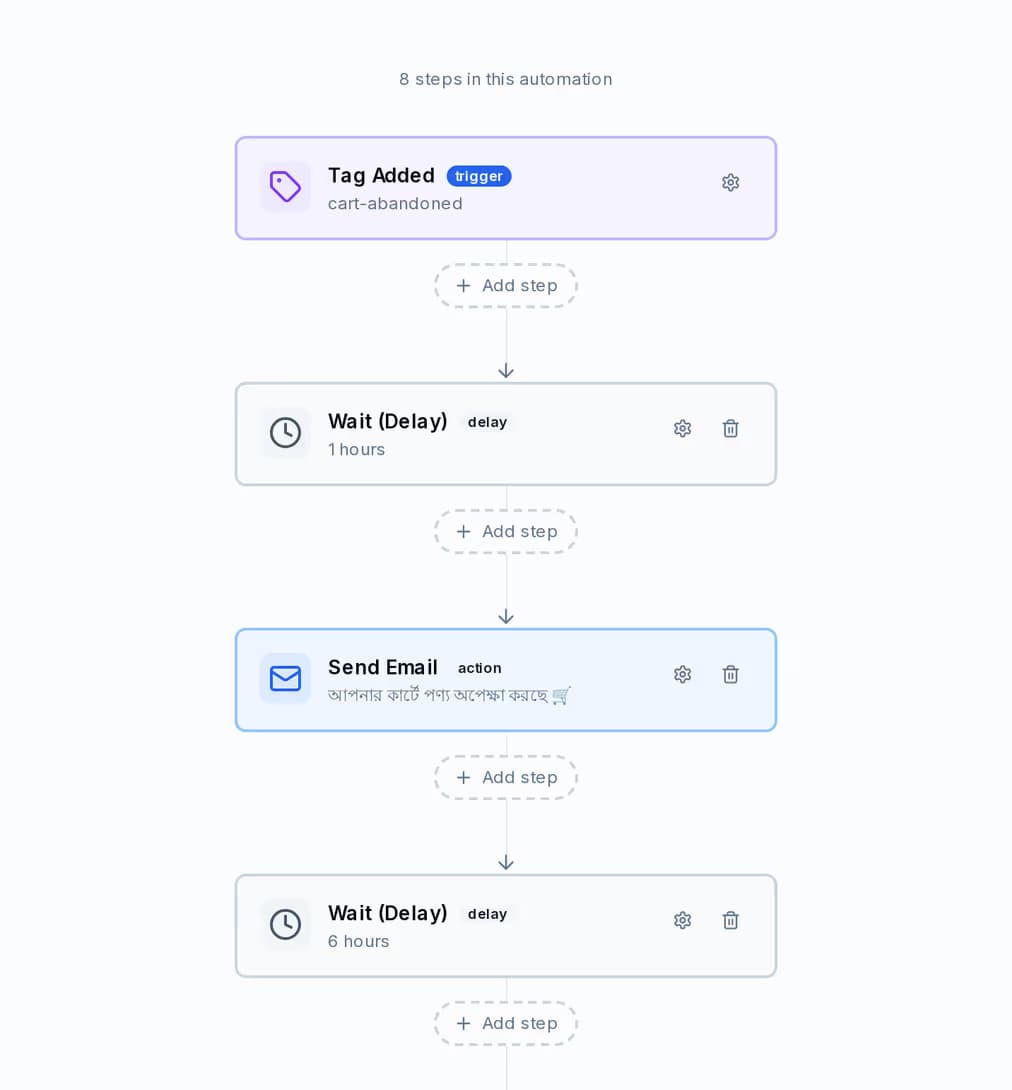
A journey is a trigger and then steps: send on any channel, wait a real amount of time, branch on a condition, add or remove a tag, update a field, or call a webhook of your own. One journey can use all three channels, so a nudge opens on email and finishes on WhatsApp.
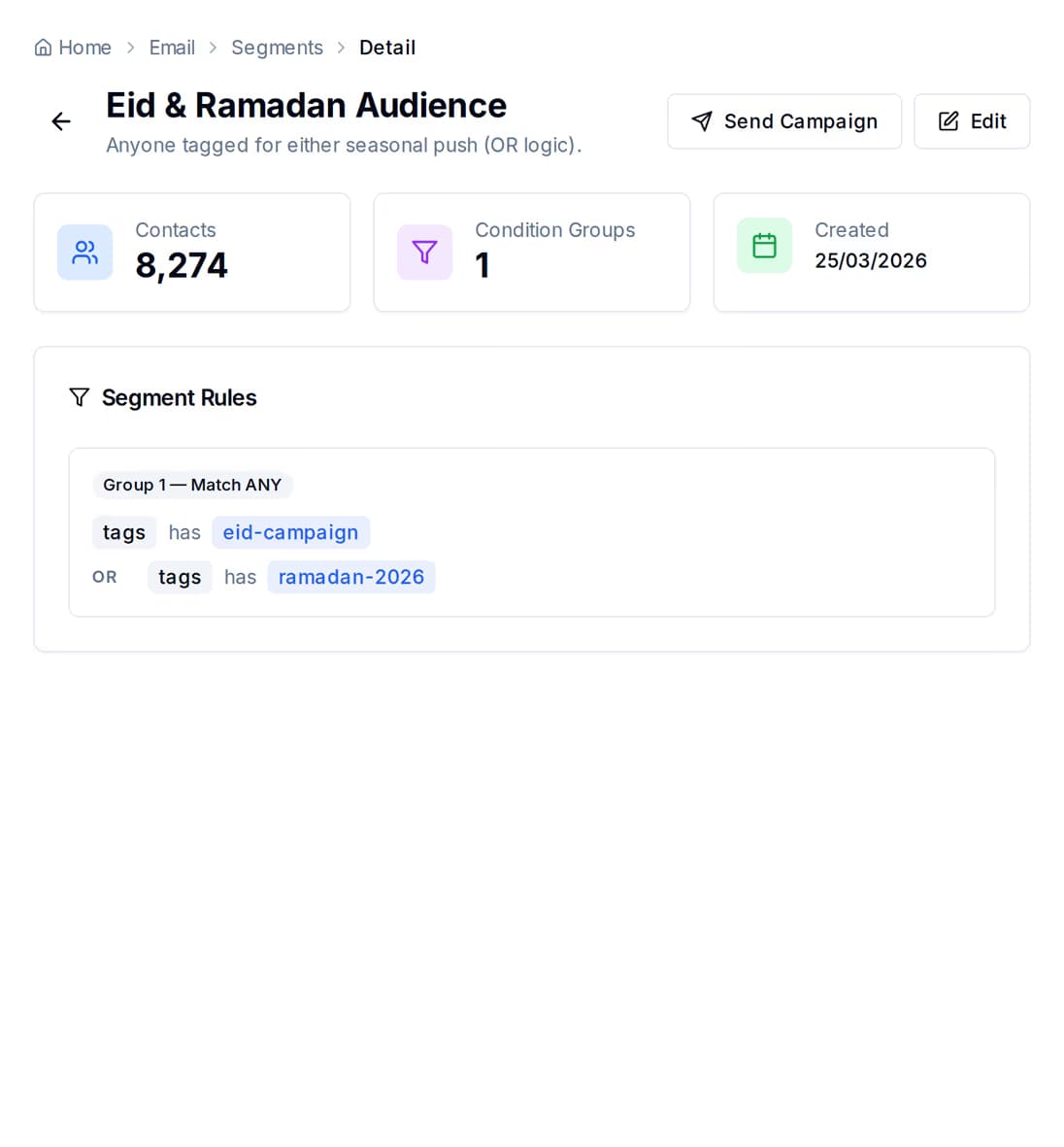
A group is a few rules, and it shows you how many contacts match while you are still writing them. Add a rule, watch the number move, then send to exactly those people.
Nothing on its own. What you pay depends on how much you send, and on whether you bring your own mail server or SMS account.
You pay a platform fee that covers the tooling — contacts, groups, journeys, the shared inbox and the reports — and then you pay for the messages you send. Connecting HubSpot adds to neither.
Managed volume waives part of the platform fee, and buying across email, SMS and WhatsApp at a high enough tier waives it entirely. A longer billing term discounts the fee and the volume on separate ladders.
Point QuickGrow at your own mail server or SMS account and the platform fee is all you pay. WhatsApp runs on your own number too — you pay Meta directly, at Meta's own rate, with zero QuickGrow markup and nothing committed monthly.
Not today. The connector reads your portal and reports how many contacts and deals it saw; it does not create anything in QuickGrow. Your contact list here is built in three ways: upload a spreadsheet, capture people with a form or a popup on your own site, or push them in from your own code through the API. If automatic contact creation is the piece you are waiting on, say so on the contact page and we will tell you where it stands.
Export the list you want from HubSpot as a CSV and upload it under Contacts. QuickGrow reads the header row, proposes a column mapping and shows you a preview before anything is saved. You choose the tags every row carries in and the consent it records for the channel. People already in your list are matched on their email address and updated rather than duplicated, and each genuinely new contact can start a welcome journey on the way in.
No. The connection reads. Read access to contacts and deals is all the token needs, and no contact, deal, property or note is created, edited or deleted in HubSpot. Everything moves one way.
Every six hours, automatically, for every connection that is switched on. The Integrations screen shows the connection and lets you remove it; there is no sync button on it. If your team needs a read on demand, the API has an endpoint for it, and the answer comes back as the same counts.
No. Journeys in QuickGrow start from its own events: a contact created or updated, a tag added or removed, a form submitted, a campaign opened or clicked, or a date held on the contact. A deal moving in HubSpot is not one of them — the six-hourly read counts deals, it does not raise an event. For follow-ups that must be automatic, the date-based trigger is the one to build on: a renewal date, a contract end, a review date. Anything else you run as a campaign to a group.
Neither. You create a private app inside your own HubSpot account and paste its access token into QuickGrow. One field, no redirect, no password shared, and you can delete the app in HubSpot whenever you want.
The shape is the same: credentials you make yourself, read-only, on the same six-hour schedule, encrypted at rest. Two differences are worth knowing. Shopify and WooCommerce read customers, orders and products and ask only for what changed since the last good run, while HubSpot reads contacts and deals and walks the full list every time. And the store connectors call an address you type, which is checked before every call, while HubSpot has no address to give — only the token.
The scheduled reads stop and the connection is marked inactive. Nothing further is read from your portal, and your admins are told it happened. Deleting the private app in HubSpot closes it off from that side as well.
One token connects the portal. Email, SMS and WhatsApp sit in the same account, on the same bill, with the groups and journeys that decide who hears what.
 CyberCraft BangladeshQuickGrow AI
Run every channel from one platform. Bring your own SMTP, SMS gateway, and WhatsApp number — or use ours.
See pricing →