The knowledge base
Our published guides, grouped into categories. Search runs over the title, the summary and the body of every article, so you can look for the error message you are staring at rather than guessing the topic.
A knowledge base anyone can read, a ticket you can open and follow without an account, and live chat with our team. This page is about the help you get from us. If you came looking for a way to answer your own customers, that is the shared inbox — there is a signpost to it further down.
Pick whichever suits the question. None of them needs a paid plan, and two of them do not need an account at all.
Our published guides, grouped into categories. Search runs over the title, the summary and the body of every article, so you can look for the error message you are staring at rather than guessing the topic.
Give an email, pick a department, describe the problem. You get a private link back — keep it and you can read replies and reply again without ever creating an account. Signed in, your tickets are simply listed in your account.
Type to a person on our team. Start it as a visitor with a name, an email and a department, or from inside your account, where the conversation stays attached to you and picks up where it left off.
Support queues are usually a black box. This one is not complicated, so here it is.
General, Billing, Technical or Domains. It is the only routing decision you make, and it decides which of our people can pick the conversation up.
A chat goes to whoever is online, covers that department, and currently has the fewest conversations open. If nobody is available it waits rather than bouncing.
You see the status change from queued to assigned. If that person goes offline mid-conversation, your chat is put back at the front of the queue instead of dying with their session.
A ticket moves through open, in progress, waiting on you, waiting on us, and finally resolved or closed — so you can always tell whose turn it is.
The knowledge base is public — no account, no paywall, and you can read it before you decide whether to sign up at all. Articles are grouped into categories and each one carries a thumbs up or down, which is how we find out which explanations are not working.
Plenty of people land here wanting a help desk to run for their own customers. That is not what this is — the tickets and chat above are between you and us. What you want is the shared inbox.
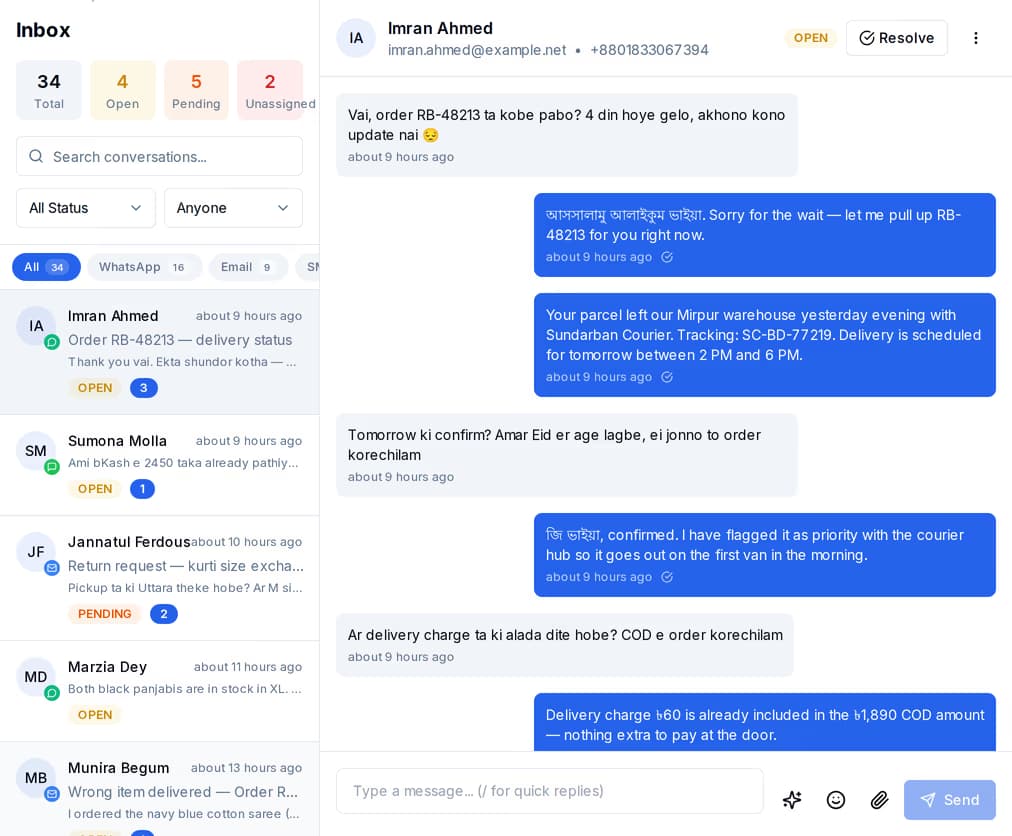
They do not open tickets — they message you on whatever they already have open. The shared inbox puts all three channels in one list your whole team works from, with assignment so two people do not answer the same person.
No. The knowledge base is open to anyone. You can open a ticket with just an email address, and you can start a live chat with a name, an email and a department. An account only changes where your tickets are listed — under your profile instead of behind a private link.
When you submit a visitor ticket you get a private link back. That link is the only way into the thread, so save it. Open it any time to read replies and add another message.
The conversation waits in the queue instead of failing. The next person who comes online and covers your department picks up the longest-waiting chat first. If the agent handling you drops off mid-conversation, your chat goes straight back into the queue rather than being lost.
You do not need an account, a card or a call booked. Search the guides, or send a question and see what comes back.
 CyberCraft BangladeshQuickGrow AI
Run every channel from one platform. Bring your own SMTP, SMS gateway, and WhatsApp number — or use ours.
See pricing →