Nobody follows up
A buyer gets as far as checkout and stops. Unless something reaches them in the next day or two, that basket is gone — and you never find out what would have brought them back.
Connect your Shopify or WooCommerce store, chase the carts it leaves behind over email, WhatsApp and SMS, answer buyers in one shared inbox, and give repeat customers points worth coming back for.
Most of what an online store loses is not lost at the product page. It is lost in the hours after someone puts something in a basket and closes the tab, in a WhatsApp thread sitting on one person's phone, and in the months after a first order when nobody hears from you again.
A buyer gets as far as checkout and stops. Unless something reaches them in the next day or two, that basket is gone — and you never find out what would have brought them back.
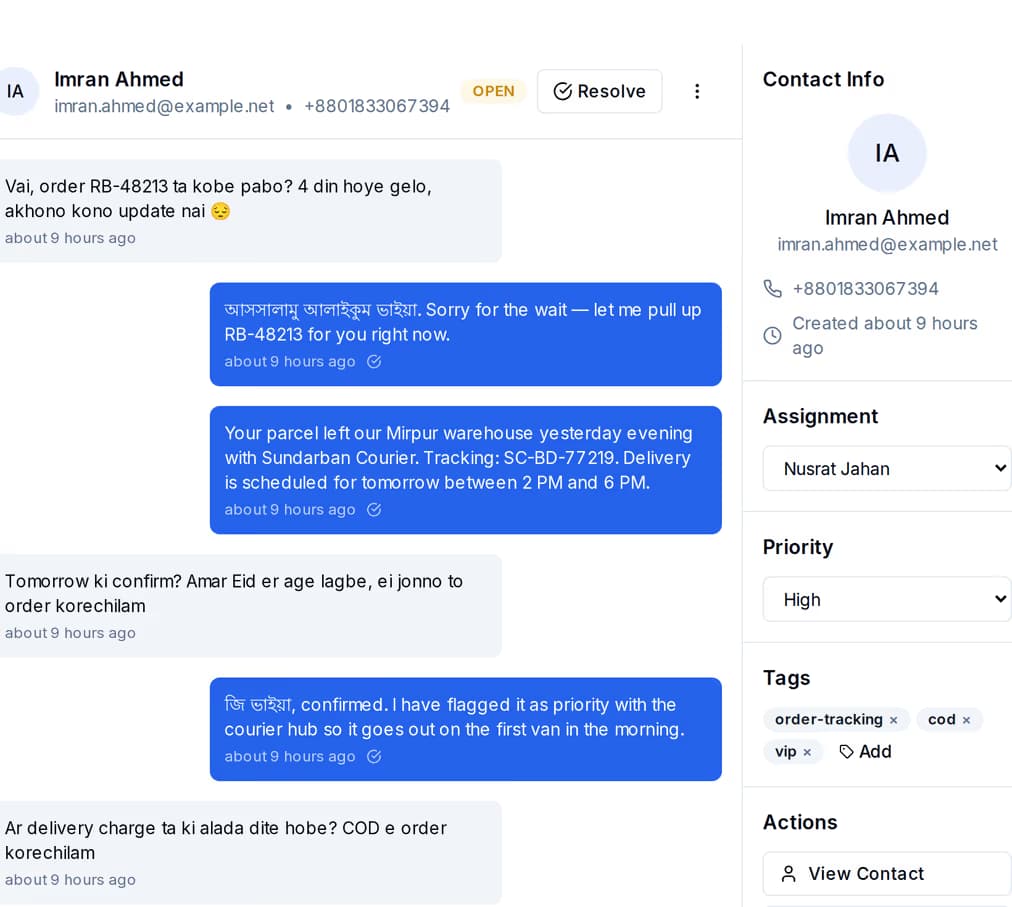
Half your orders are agreed in a WhatsApp thread. Whoever owns that phone owns the customer, nobody else can answer, and none of it reaches your marketing.
A first-time buyer is the expensive one. If nothing reminds them you exist, they buy once, and the next order goes to whoever showed up in their feed that week.
Point QuickGrow at your Shopify or WooCommerce store and it pulls your catalogue, your orders and your customers in. The keys you paste are stored encrypted and used only to read from your store — nothing is placed, changed or cancelled on your behalf.
| Shopify | WooCommerce | |
|---|---|---|
| What you connect with | Your shop domain and an admin access token | Your store address, an API key and its secret |
| Products pulled in | Yes | Yes |
| Orders pulled in | Yes | Yes |
| Customers pulled in | Yes | Yes |
| Refreshes on its own | Every six hours | Every six hours |
| Run a sync yourself, any time | Yes | Yes |
| Live updates from your store checked before they are accepted | Yes | Yes |
| Disconnect in one click | Yes | Yes |
Not a mystery box. A cart recovery is four decisions you make once: what starts it, how long you wait, which channel speaks next, and what you offer. Here is the shape most stores land on.
Your store — or your own code, through the API — puts the tag cart-abandoned on that contact. The tag is the trigger. Nothing else has to happen for the journey to begin.
A short reminder that the order was never finished. You write it once and it goes out to everybody who reaches this step, in Bangla or English.
The same person, in the app they actually read. This is where the offer goes: a discount code, free delivery, or a deadline you set yourself.
A last, short nudge. The journey finishes by tagging the contact, so recovered carts are a group you can count and reuse later.
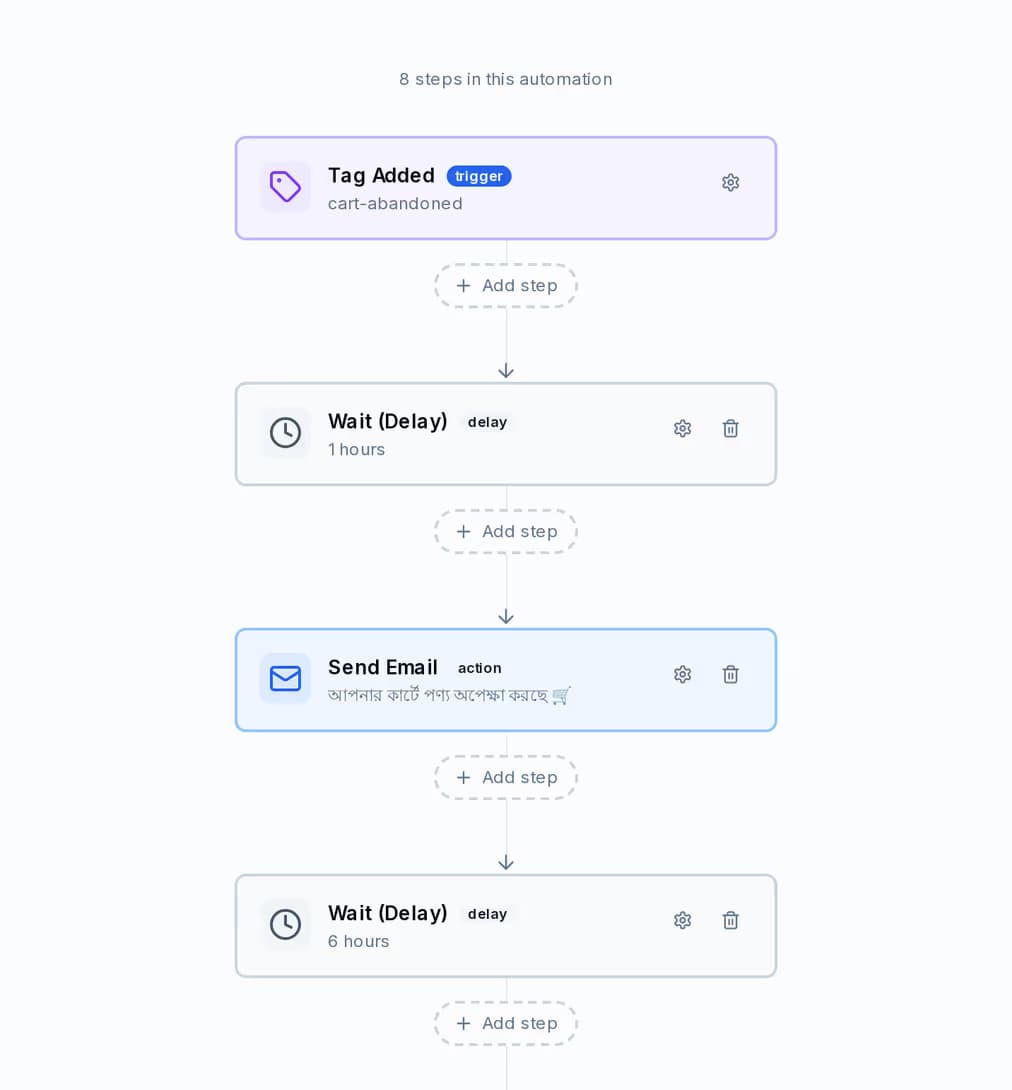
Every step is a block you drop on a canvas: send an email, send WhatsApp, send SMS, wait, check a condition, add or remove a tag, update a field, or call your own system. The waits are real hours and days, counted per person from the moment they entered.
QuickGrow uses the official WhatsApp Cloud API from Meta, so messages come from your business profile rather than someone's personal number. Meta prices WhatsApp by what a message is for and bills you directly for it — QuickGrow doesn't add a markup on any of the three.
| Utility | Authentication | Marketing | |
|---|---|---|---|
| What it carries | Order confirmations, delivery updates, payment reminders | Login and verification codes | Offers, new arrivals, cart reminders |
| A store sends it when | Something happened to an order | Someone is signing in or confirming a number | You want to start a conversation |
| Needs a template approved by Meta first | Yes | Yes | Yes |
| Replies land in the shared inbox | Yes | Yes | Yes |
When a customer messages you, WhatsApp gives you 24 hours to answer in your own words — sizes, stock, delivery, anything. Once it closes you send an approved template to start again, and QuickGrow handles that switch for you.
WhatsApp, SMS and email threads land in the same inbox, with the customer record, their tags and their status beside them. Assign a thread, answer it, resolve it — no one is waiting on whoever has the phone.
QuickGrow has a points programme built in, and it needs no separate app for your customers to install. Award points against a buyer when an order is paid; QuickGrow keeps the balance, the lifetime total and the tier, and moves them up the moment the lifetime total crosses the line.
The four tiers sit at 0, 500, 2,000 and 5,000 lifetime points. Points earn faster at every step up — 1.25x at Silver, 1.5x at Gold, 2x at Platinum — so the buyers who spend most keep pulling ahead on their own.
Set what points can be spent on: a discount code, a free product, free shipping, or something you describe yourself. Give each reward a points cost and a stock count, and read every redemption back in one history.
Hand each customer a code of their own, count what comes in through it, and see your top referrers on a leaderboard. Points land automatically when a referral goes through.
Choose how long points last and how much warning a buyer gets before they run out. QuickGrow runs the expiry itself, once a day, and writes every earn, spend and expiry into the history.
Three channels are only worth having if you can tell them apart. Every send is counted, and the same window is reported for all three side by side.
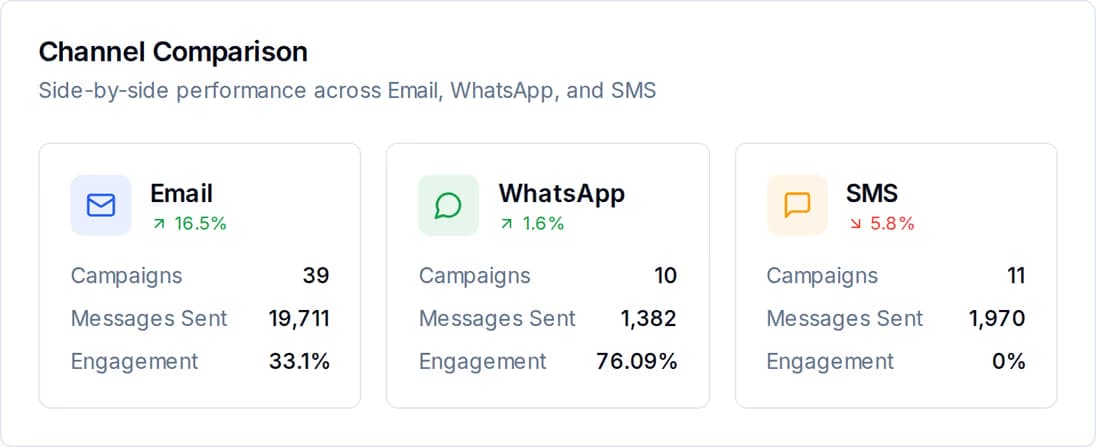
Sent, delivered, opened and clicked, per campaign and per channel, over the window you choose — so the decision about where next month's budget goes is a reading, not an argument.
Two things: a platform fee, and the messages you send. Buying managed volume waives part of the platform fee, and buying enough Email and SMS volume waives it entirely. Already have your own mail server or SMS account? Bring it and pay the platform fee only. A longer billing term discounts both, on separate ladders.
No. Plenty of sellers here run on a Facebook page and a phone. Upload a spreadsheet, add buyers by hand, or collect them with a form or popup, and everything on this page still works. Connecting a store just means your products, orders and customers stay current without you copying anything.
Your store tells it. When someone leaves a basket, your store or your own code tags that contact — cart-abandoned, or whatever you call it — through the API, and the tag starts the journey. Any event you can detect can start a journey the same way.
Yes. Email, SMS and WhatsApp all carry Bangla, and so do saved templates and automation steps. Most stores here mix both in the same journey.
Connect your store, build one journey, and let it run while you pack orders.
 CyberCraft BangladeshQuickGrow AI
Run every channel from one platform. Bring your own SMTP, SMS gateway, and WhatsApp number — or use ours.
See pricing →