
WhatsApp

Sell and support on WhatsApp.

One shared inbox for every reply, broadcast campaigns to your customer list, all from your own WhatsApp number. You pay Meta directly, at Meta's own rate — QuickGrow adds zero markup.

Official Meta Cloud APIYour own business number0% markup — pay Meta directly
A thread, start to finish
Utility templateYour order is packed and leaves our shop today.
Can you deliver on Friday instead?
Free reply, inside 24 hoursFriday works. I have moved it for you.
  • The reply opened a conversation in the shared inbox
  • That reply started a 24-hour window to answer freely
  • Meta bills you directly — QuickGrow adds no markup
  • Login codes go as Authentication templates, priced on their own

WhatsApp has three rules that catch people out.

None of them are QuickGrow rules — they are how Meta runs the WhatsApp Business Platform. You should know them before you pay, not after your first send comes back blocked.

The 24-hour window

Free text only after they write first

When a customer messages you, you have 24 hours to reply with anything you like. After that, only an approved template goes through. QuickGrow checks the window before every send, so you find out instead of guessing.
Templates

Approved in your account, not ours

You draft the template here — body, header, footer, buttons and variables. You approve it inside your own WhatsApp Business account, then Sync pulls it back with its real status: approved, pending or rejected.

Cost

You pay Meta, not us

Every paid message is billed by Meta directly to your own payment method, at Meta's published rate. QuickGrow doesn't add a markup, hold a wallet, or block a send over balance — if Meta will send it, so will we.

Four steps from a connected number to a sent campaign.

  1. Connect your number

    Start the guided sign-up, or enter your WhatsApp Business ID, phone number and access token. The token is stored encrypted and never shown again. Messages go out from your number, not a shared one.

  2. Bring your templates in

    Sync reads every template on your WhatsApp Business account and files it here with its category, language and approval status. Draft new ones in QuickGrow, approve them in Meta, sync again.

  3. Choose who gets it

    Target saved segments or tags, and exclude a tag so one group never gets the message. Only active contacts count. You see the recipient number before you commit, and can preview a segment count without saving it.

  4. Send now or schedule

    Pick a date and time in your own timezone and the campaign goes out then. Pause a run mid-send and resume later: it picks up where it stopped rather than starting over.

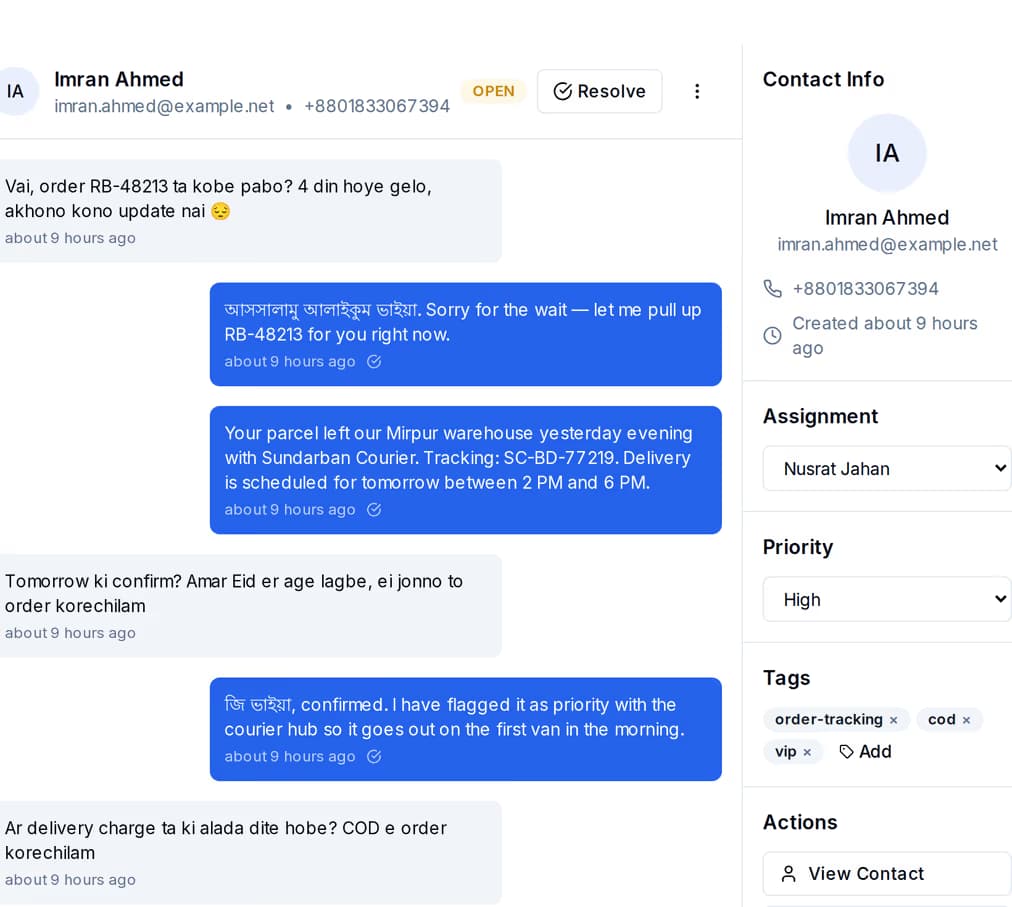
A WhatsApp order-tracking conversation in the shared inbox, with the contact rail showing status, tags and the assigned teammate
Two-way, not broadcast-only

Every reply lands in one inbox.

An inbound WhatsApp message matches or creates the contact, opens a conversation and appears in the shared inbox — beside your SMS and email threads. Anyone on the team can pick it up and answer in their own words.

  • Assign a conversation to a teammate, tag it, resolve it, reopen it
  • Saved quick replies for the questions you answer twenty times a day
  • A chatbot flow can answer first and hand the thread to a person when it runs out of road

Three kinds of template, priced three ways by Meta.

Meta files every template under one of three categories and prices them differently. QuickGrow doesn't add a markup to any of them — you pay Meta's own published rate directly, whichever category you send.

Utility

  • Order confirmed, packed, out for delivery
  • Payment received, invoice ready
  • Appointment confirmed or moved

Authentication

  • One-time login codes
  • Verification for a new device or number
  • Password reset confirmations

Marketing

  • Offers, discounts and new arrivals
  • Event and campaign announcements
  • Win-back messages to a tagged group
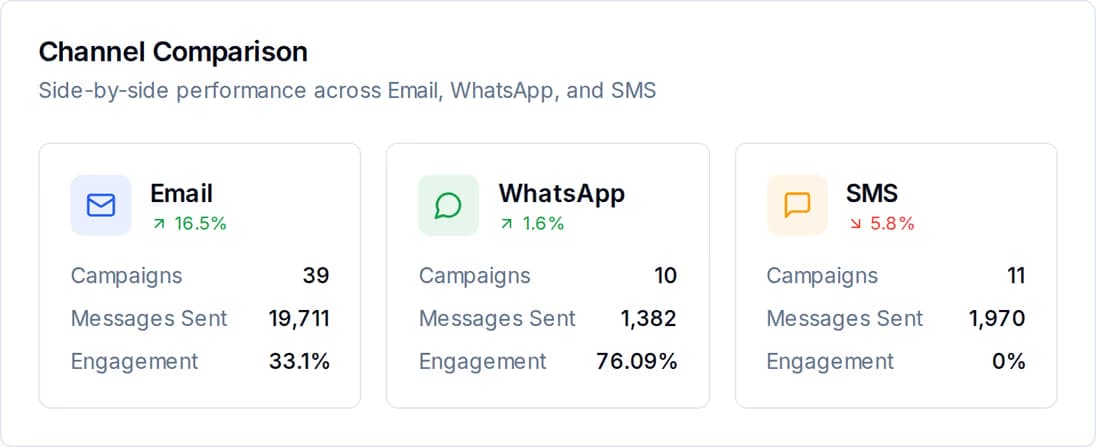
The channel comparison report putting WhatsApp, SMS and email campaign performance side by side
What you can see afterwards

Delivered, read, replied — per person.

Each message carries its own state and timestamps, so a campaign is more than one number. Open the recipient list and you can see who it reached, who read it, who wrote back, and exactly why a send failed.

  • Sent, delivered, read, replied and failed, over 7 days, 30 days, 90 days or a year
  • Broken down by campaign, by template and by brand
  • WhatsApp beside your SMS and email, so you can see which channel earns its cost

Everything the WhatsApp channel comes with.

Your own number

Guided sign-up or manual connect. Credentials are encrypted at rest, and sends go out under your business name.

Targeting and exclusions

Saved segments, tags, an engagement-score threshold, and an exclude list so one group never gets a message.

Scheduling

Set a date and time in your timezone. Pause, resume, cancel or duplicate a campaign.

Shared inbox

Replies become conversations you can assign, tag and resolve, alongside SMS and email.

Chatbot with handoff

An automated flow answers common questions and passes the thread to a person when it needs one.

Your own Meta billing

You pay Meta directly for anything outside a free window, at Meta's own rate. QuickGrow adds no markup and never blocks a send over balance.

Delivery reporting

Per-recipient status with failure reasons, plus campaign, template and channel-level reports.

Sending guardrails

Quiet hours, per-contact caps with a cooldown, and a spam check before a message goes out.

The things buyers ask before they sign up.

Do I need my own WhatsApp Business number?

Yes. QuickGrow sends through the official Meta Cloud API using the number on your own WhatsApp Business account, so the customer sees your business and not a shared sender. Connect it through the guided sign-up, or by entering your business ID, number and access token in settings.

Does QuickGrow submit my templates to Meta for approval?

No. You draft the template in QuickGrow and approve it inside your own WhatsApp Business account. Sync then pulls every template back with its real category, language and status, so you only ever send something Meta has already cleared.

Can I send at night?

No. WhatsApp sends are blocked during quiet hours — 21:00 to 08:00 in Bangladesh, with the window set per country — and that covers order updates and one-time codes as well as offers. Authentication templates skip the 24-hour window check, not the quiet-hours check. Schedule the campaign for after 08:00 instead.

Start on WhatsApp with your own number.

Connect the number you already use and bring your approved templates across — you pay Meta directly, QuickGrow adds no markup.