Login codes & 2FA

Codes that arrive before they expire.

A one-time code that shows up late is the same as one that never showed up. Send it over WhatsApp or SMS with the same API call, read back what happened to that exact message, and pay for it per message.

WhatsApp Authentication templatesSMS on the same endpointStatus per message

A login code is not a campaign.

A campaign can wait an hour. A code cannot. One-time sends go out one at a time against a single recipient, come back with their own id, and are billed per message rather than per campaign — so you can tell in seconds whether the person waiting on a form got it.

Sent, not scheduled

Sent the moment you ask

A code is not queued behind a campaign or batched with anyone else — it is dispatched against one recipient as soon as the request lands. Two rules still apply and you should plan for them: sending is held overnight during quiet hours, and an SMS needs a consent record on file for that person.
One id, one outcome

You know what happened

Every send returns the id of that individual message. Read it back for queued, sent, delivered, failed — with the time each state was reached and the reason if it failed. No guessing from an aggregate report.

Two channels, one call

Pick the channel per send

The same endpoint takes channel "whatsapp" or channel "sms". Choose per request, in your own code, from whatever you know about that user — no separate integration for the second channel.

From your login form to their phone.

Four things happen, in this order. Steps 1 and 4 are yours; the middle two are ours.

  1. Get a template approved

    WhatsApp requires a template approved by Meta before you can send a code. Write it in QuickGrow under the Authentication category, or pull the ones Meta already approved for your account with a single sync. SMS needs no approval — a plain text body is enough.

  2. Make one API call

    POST the channel, the recipient, the template id and the code as a variable. The response comes back straight away with the message id and its state, so your login flow never blocks on a phone network.

  3. We queue and send it

    The send goes out through your own WhatsApp Business account or SMS gateway — or the managed one, if you would rather not run either. SMS is metered from your QuickGrow balance and refunded if it fails outright; a WhatsApp Authentication code is billed by Meta directly to your own payment method, so nothing is deducted here.

  4. Read the outcome

    Poll the message id, or take a webhook on sent, delivered, failed and bounced. If WhatsApp did not land it, send the same code again with channel "sms" — the second attempt is a decision you make, in one more call.

Send it, then look it up.

Authenticate with a single API key header. The send is one request; the status is one more against the id it returned.

POST /api/v1/messages
X-API-Key: mk_…

{
  "channel": "whatsapp",
  "to": "+8801700000000",
  "templateId": "login_code",
  "variables": { "code": "492013" },
  "metadata": { "userId": "u_8812" }
}

# same shape for "channel": "sms"
GET /api/v1/messages/:id
{ "data": {
  "id": "msg_9fA2",
  "channel": "whatsapp",
  "status": "delivered",
  "sentAt": "2026-08-10T09:14:22Z",
  "deliveredAt": "2026-08-10T09:14:25Z",
  "failureReason": null
} }

# or list: GET /api/v1/messages?status=failed
One key headerScoped keys — send and read are separate1,000 requests a minute per keyYour own reference echoed back
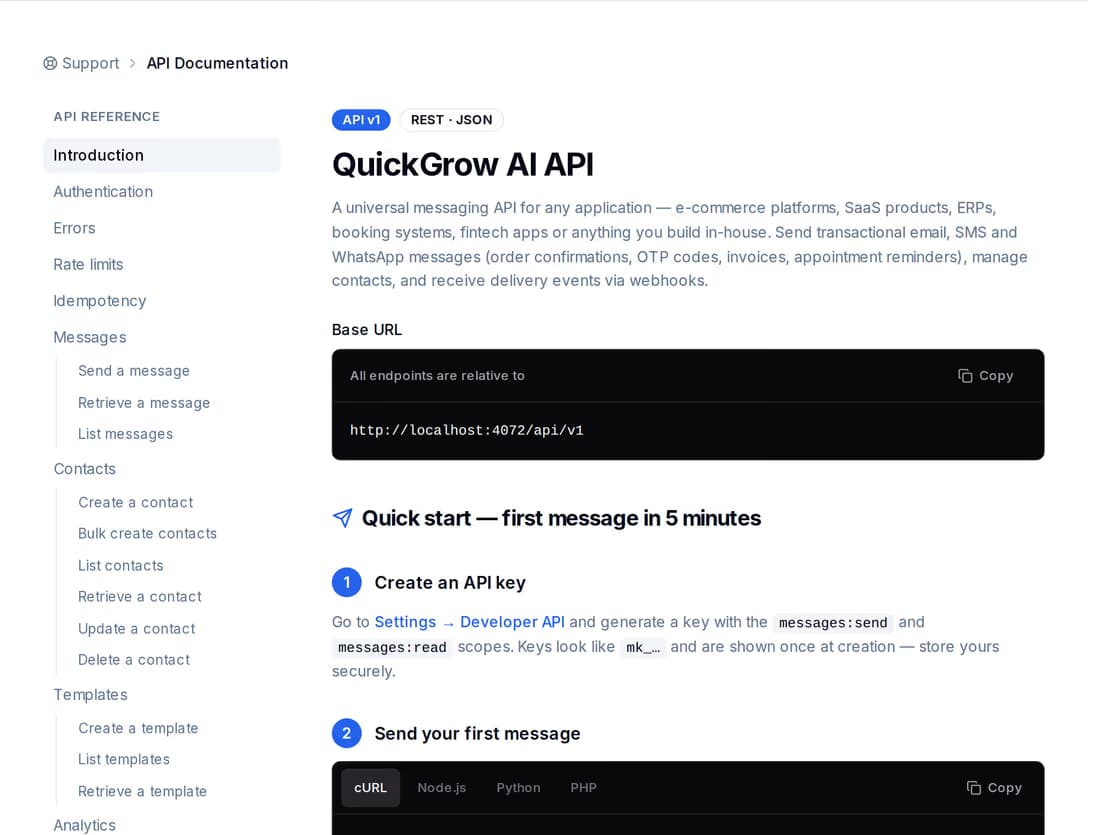
The QuickGrow API reference, with the endpoint navigator on the left and the full request and response specification beside it.
Built to integrate

Everything is written down.

The send endpoint, the status reads and the webhooks are all documented in the product itself, and described by a machine-readable specification you can import into your own tooling. There is nothing to install — it is a REST call with one header.

  • Every response carries the remaining request budget for your key, so your client can back off before it hits a wall.
  • Keys are scoped: a service that only sends codes never needs the permission to read your contacts.
  • Repeat a send with the same retry key within 24 hours and you get the original response back — one code, not two.
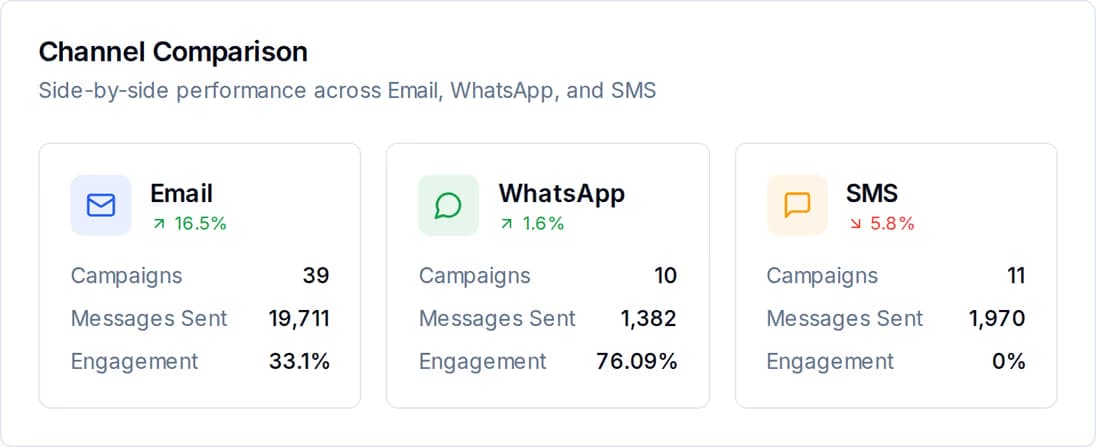
A channel comparison report showing email, WhatsApp and SMS volume side by side.
After it sends

Watch it, don't hope.

Every code you send is a message row of its own, with the state it reached and the time it reached it. That is what you read back over the API, and it is the same record the reports are built from — so support can answer “did my code arrive?” without asking engineering.

  • Queued, sent, delivered, failed and bounced — each with its own timestamp.
  • A failure carries a reason and a code, so a wrong number and a dead gateway do not look the same.
  • Subscribe to webhooks and react the moment a send fails, instead of polling.
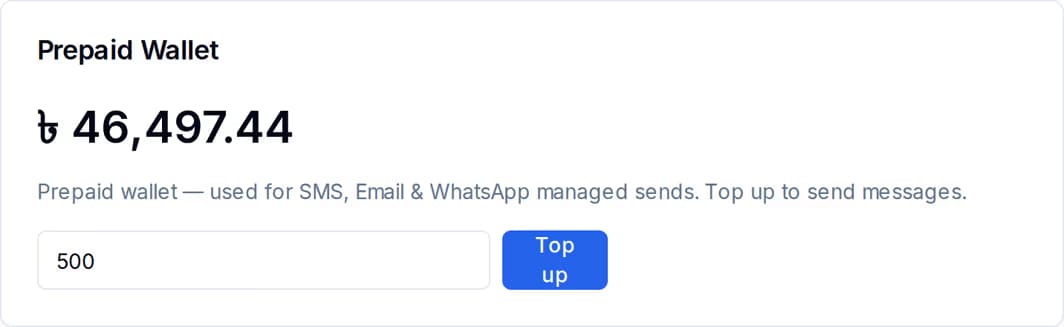
The prepaid wallet card in billing, showing the current SMS balance in BDT and the top-up control.
What it costs

Two channels, two billers.

SMS runs on your QuickGrow balance: each code is priced from the destination country, taken in BDT the moment it sends, and refunded if it fails outright. WhatsApp Authentication works differently — Meta bills you directly for it, at Meta's own published rate, and QuickGrow adds no markup.

  • An SMS code is priced from the destination country, in BDT, and taken from your prepaid balance as it sends.
  • A WhatsApp Authentication code is billed by Meta straight to your own payment method — it never touches your QuickGrow balance.
  • A failed SMS send is refunded to the balance; QuickGrow never holds a wallet or blocks a WhatsApp send over it.

WhatsApp or SMS for a code?

Most teams end up using both: WhatsApp where the number is on it, SMS everywhere else. They send the same way and they report the same way — what differs is the set-up and how each one is sold.

Both channels run through the same send endpoint, the same status reads and the same webhooks.
WhatsApp AuthenticationSMS
Same send endpointYesYes
Needs a template approved by Meta firstYesNo
Message body comes fromAn Authentication template, with the code as a variableYour own text, or an SMS template with variables
Connect your own account or gatewayYesYes
Managed option if you would rather notYesYes
Status you can read back per messageYesYes
Delivery webhooksYesYes
Held back overnight during quiet hoursYesYes
Needs a consent record for that personNoYes
How you buy volumeNothing to buy — Meta bills you directly, at Meta's own rateMasking and Non-Masking, each on its own volume slider

Before you wire it in.

Do I need Meta to approve something before I can send a code?

For WhatsApp, yes — Meta requires an approved template, and login codes belong in the Authentication category. You approve the template in your own WhatsApp Business account, then pull it into QuickGrow so it is ready to reference by id. You can also draft one here first to agree the wording, but the approval itself happens on Meta’s side. SMS needs no approval; you can send a code as soon as your gateway is connected.

What happens if WhatsApp does not deliver the code?

The message ends up in a failed state with a reason attached, and a webhook fires. There is no silent automatic switch to SMS — the retry is yours to make, so you stay in control of whether a second code goes out and what it says. In practice it is one more call to the same endpoint with channel set to sms.

Will a code sent at 11pm be held until morning?

It can be. Quiet hours are applied to SMS and WhatsApp on the send path, not just to campaigns, and in Bangladesh the window is 9pm to 8am. A code requested inside that window is refused rather than queued, and your request gets an error back naming the reason. Email is not affected. If you send codes around the clock, raise it with us before you go live so the window is set correctly for your account.

Wire up login codes this afternoon.

Create an account, connect a channel, and send your first code with one call. No installation, no separate integration for the second channel.