It will not text at midnight
SMS and WhatsApp steps are blocked during quiet hours — 9pm to 8am in Bangladesh, set per country. The check runs as the message goes out, not as a setting on a page you might forget. Email is not held back.
Build the journey once. A date on the contact, a list you import, or an event your own system sends starts it — then the email, SMS and WhatsApp steps go out without you.
You know the ones you keep meaning to send. The reminder before a clinic visit. The nudge a week before a subscription renews. The message the day before a delivery. They are all the same shape: a date sitting on a customer record, and nobody free to watch it. Here is that journey, built from steps that exist today.
The date lives on the contact as a field of your own — appointment date, delivery date, warranty end, renewal date. Your booking system, shop or back office writes it once through the QuickGrow API, or an earlier journey sets it with an update step.
Choose that field and how many days before or after the journey should start. Three days before, on the day, seven days after — your choice.
A WhatsApp message first. Wait two days. Then an SMS as a second nudge. Add a tag at the end so you can see who was reminded.
The date is checked every minute. Each contact enters at most once a day, so nobody gets the same reminder twice.
Getting the date onto the contact is the one part that needs your system to talk to QuickGrow, and it is a one-time job. After that the journey is yours to change without touching code — and the date trigger is the only one that keeps running with nothing else connected. No event to send, no button to press: every minute, every contact whose date comes round, every day.
Most tools blur this line, and you find out where it really is a month after launch. So here it is plainly: what starts a journey in QuickGrow, and what has to happen first.
| Runs by itself | What sets it off | |
|---|---|---|
| A date on the contact | Yes | A date field your system keeps on the contact — checked every minute, a set number of days before or after. Appointments, renewals, deliveries, birthdays. |
| A list you import | Yes | Every new contact a CSV import creates. This is the one to hang a welcome sequence on. |
| An event your system sends | Your side | Your shop, website or back office tells QuickGrow what happened — a tag added or removed, a contact updated, a form submitted, an email opened or clicked. |
| You start it by hand | You choose | Pick a contact and start the journey for them. Useful for testing a flow before you switch it on. |
There are no placeholder nodes on the canvas. A step sends a real message, changes the contact, waits, decides which way to go, or calls a system of yours.
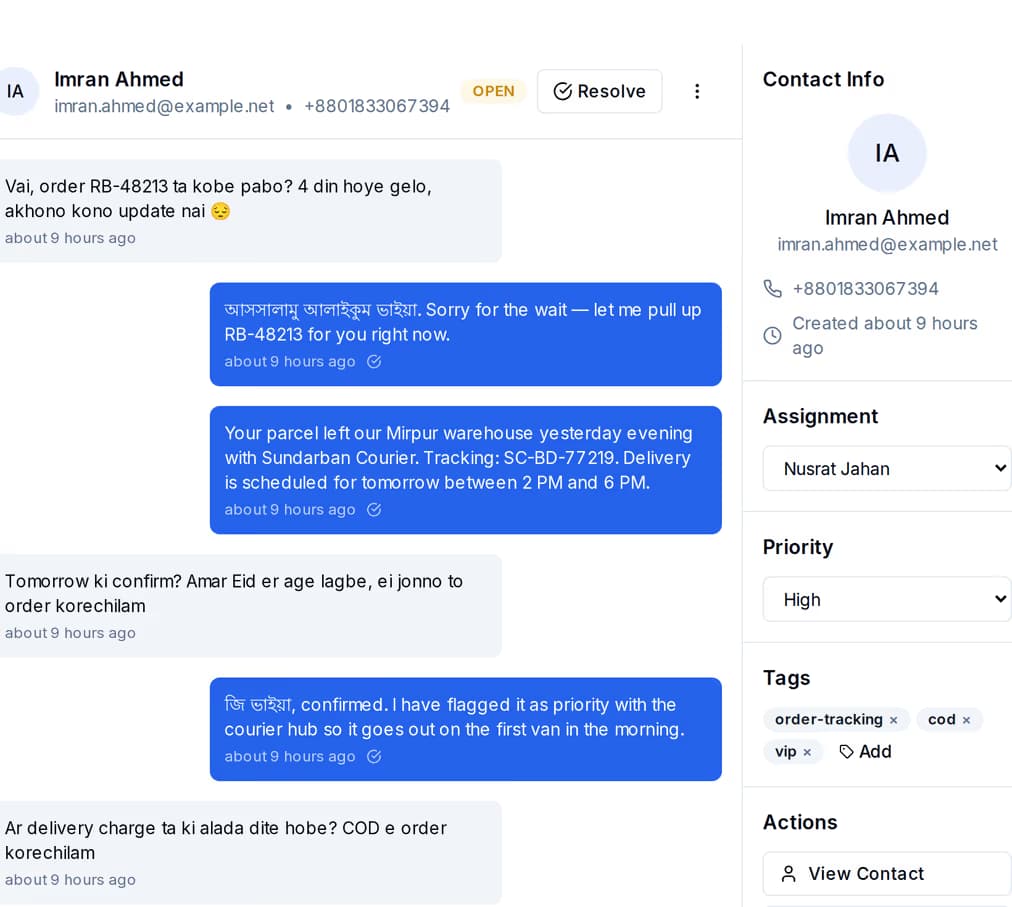
A WhatsApp or SMS step from a journey is a real message on your own business number, not an in-app notification — so the customer can just reply to it. When they do, their reply arrives in your shared inbox as a conversation your team can pick up, with the contact, their tags and their history beside it.
The risk with anything automatic is that it does the wrong thing quietly, all night, to your whole list. These are the checks that stand between a journey and that.
SMS and WhatsApp steps are blocked during quiet hours — 9pm to 8am in Bangladesh, set per country. The check runs as the message goes out, not as a setting on a page you might forget. Email is not held back.
There is a cap on how many messages one contact can get in a day and in a week on each channel, plus a cooldown between two messages on the same one. These are platform limits that apply to journeys and campaigns alike.
A contact already partway through a journey is not started again while they are still in it. The date trigger adds its own check so one contact starts at most once a day.
Each run keeps a log: which step, what it did, how long it took, and why it stopped if it did. Open a journey and you can see how many runs finished, how many failed, and how many are still waiting.
A step that fails is retried a few times before the run is marked failed. When that happens your admin users are notified, with the reason attached to the run.
A journey is a draft, active, paused or archived. Pause it and anyone partway through stops at their next step instead of carrying on — so a mistake costs you one step, not the whole list.
Not on its own. Tag, contact-updated, form-submitted and email open/click journeys start when the event is sent to QuickGrow — your shop system, website or back office calls the trigger endpoint with the contact and what happened. The two that run entirely on their own are the date trigger and a CSV import, and you can always start any journey by hand for one contact. We would rather tell you this now than have you discover it after launch.
The date lives on the contact as one of your own fields, and it gets there through the QuickGrow API — your booking system, shop or back office writes it, or an earlier journey sets it with an update step. Once it is there the trigger needs nothing else from you. On the hour: no. The trigger works to the day, so it fires on the day that matches your field and offset, not at a time you choose. It will not fire in the night, though — SMS and WhatsApp steps are held out of quiet hours, 9pm to 8am in Bangladesh.
The fields you keep on the contact record — the ones you imported, or set with an update step earlier in the same journey. It cannot branch on tags. There are nine comparisons: equals, does not equal, contains, does not contain, greater than, less than, exists, is empty, is not empty. The contact then takes the true path or the false path, and you choose which step each one goes to.
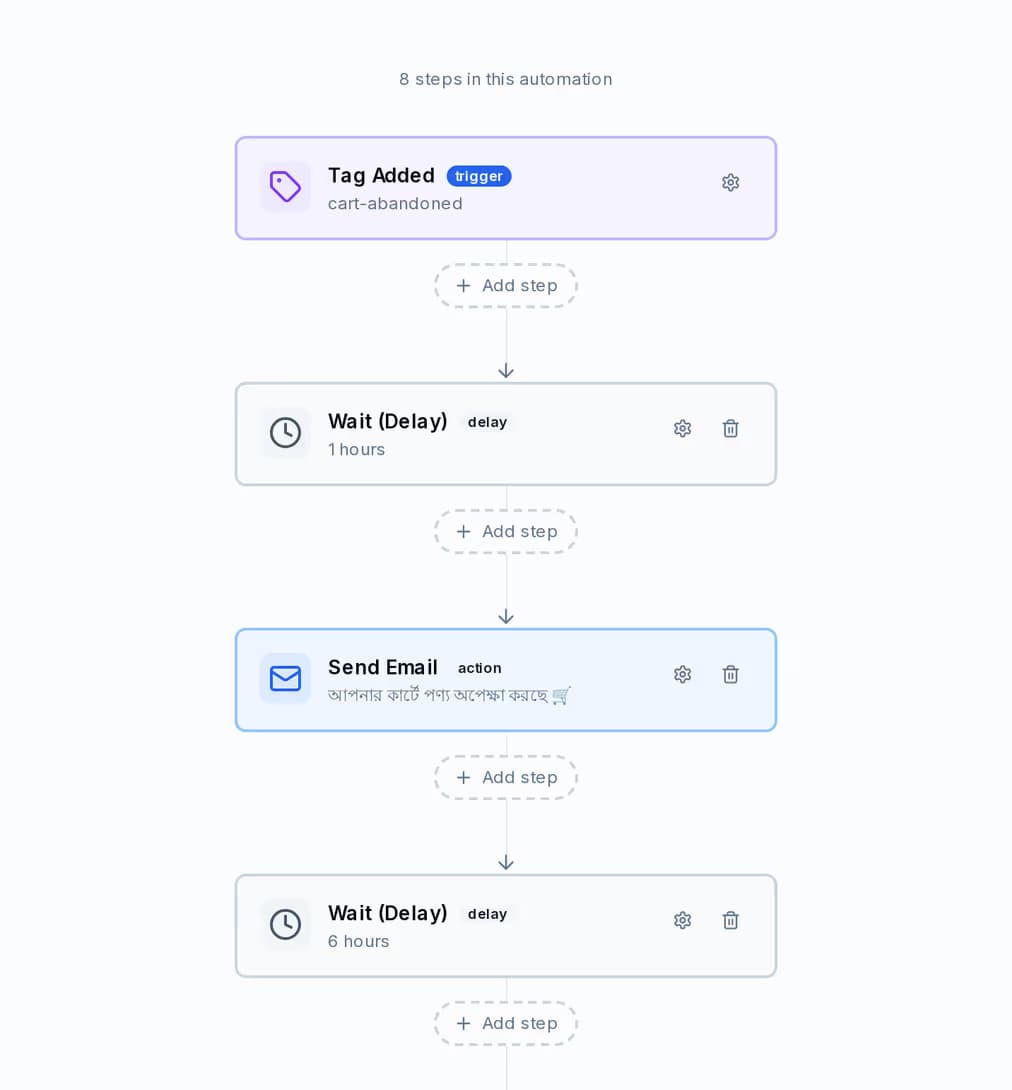
Yes, and it works on tags. There is no order or cart trigger in QuickGrow. Your shop tags the customer who left a cart and sends that event, and the journey takes over: wait an hour, email, wait, WhatsApp, wait, SMS, then tag them so you can see who was recovered. That is the journey shown at the top of this page.
No. Send steps carry text and your template content, on all three channels. If you need to get a document to someone, put a link to it in the message.
It is retried a few times with a growing gap between attempts. If it still fails, the run is marked failed with the reason, the failure is written into that run log, and your admin users get a notification. Other contacts in the same journey are not affected.
A reminder before a due date is the journey most businesses switch on first — and once the date is on the contact, it is the one that keeps running on its own.
 CyberCraft BangladeshQuickGrow AI
Run every channel from one platform. Bring your own SMTP, SMS gateway, and WhatsApp number — or use ours.
See pricing →