Guardians, not students
The contact is the guardian and the mobile number they answer. Tag each one by class, section, campus or shift, so a Class 6 notice goes to Class 6 guardians and to nobody else.
Fees reminders, results notices and admissions follow-up — sent to guardians in Bangla or English over the channel they actually read, and answered in one shared inbox.
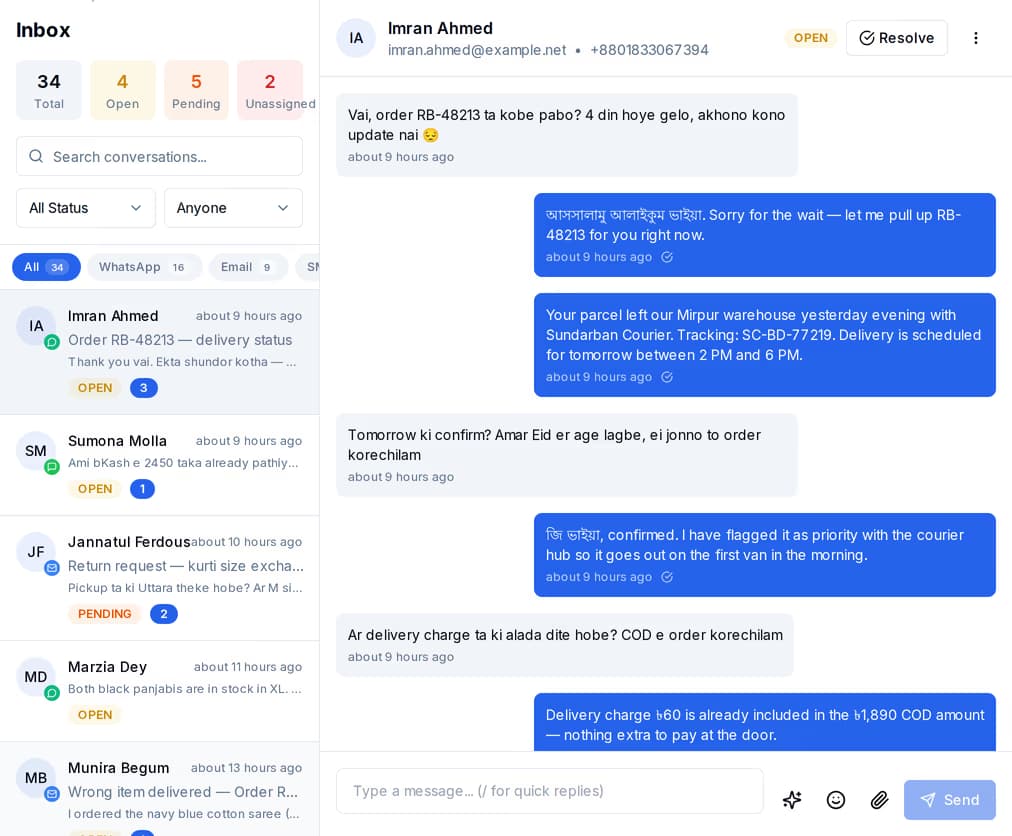
QuickGrow is a messaging system, not a school management system. Attendance registers, exam marks and fee ledgers stay in whatever you use now — a school ERP, an accounts package, or a spreadsheet in the office. QuickGrow holds a guardian contact list and sends from it. You bring the names, the numbers and the dates; it does the reaching out and collects the replies.
The contact is the guardian and the mobile number they answer. Tag each one by class, section, campus or shift, so a Class 6 notice goes to Class 6 guardians and to nobody else.
Upload a CSV and QuickGrow reads your column headings and suggests the mapping. Columns it does not recognise — fees due date, roll number, section — are kept on the contact and can be used inside a message. Guardians already on the list are skipped or updated, whichever you pick.
Consent is recorded per channel at import. A guardian who replies STOP reaches your inbox with the word recognised; once you withdraw their consent, every later send skips them without anyone keeping a list by hand.
Nearly every guardian opens an SMS. Many will also reply on WhatsApp. Email carries the long things — a prospectus, a results sheet, a term calendar. QuickGrow sends all three from the same guardian list, so you choose the channel per message rather than keeping three separate lists.
| Masking SMS | Non-masking SMS | |||
|---|---|---|---|---|
| What the guardian sees | Your school name | A number, not a name | Your business WhatsApp | Your school address |
| Works on a basic handset | Yes | Yes | No | No |
| Bangla text | Yes | Yes | Yes | Yes |
| Best for | Fees and urgent notices | Bulk notices in volume | Conversations and admissions | Prospectus, results, long notices |
| How it is bought | Its own volume slider | Its own volume slider | Volume per message category | Your own mail server, or ours |
A fees reminder from an unknown eleven-digit number gets ignored, or it gets a phone call to the office asking whether it is real. A masking sender puts your short school name where the number would be, so a guardian knows in one glance who is asking. It is the single thing that changes how seriously a school notice is taken.
Choose the short name guardians will see, then fill in what the operators ask for: the institution details and registration numbers, the address, the contact person and their national ID, sample messages, and the confirmation that your traffic stays inside Bangladesh.
The contact mobile is confirmed by a one-time code before the application can even be submitted. It then goes for approval, and the name stays unusable until that comes back. This is the part that takes days, so start it before admission season, not during it.
Once approved, choose the sender on any SMS campaign. If a campaign ever points at a name that is not approved, QuickGrow quietly falls back to the default sender instead of failing the send — the notice still goes out.
A fees reminder in QuickGrow is a date-based automation. It works off a date held on the guardian record — not off a payment gateway and not off your ledger — which is why it can run for a school that keeps its accounts anywhere. Here is the whole mechanism, start to finish.
When you import the guardian list, map your due-date column onto the contact. It is just a date sitting on a record: QuickGrow never reads your fee ledger and never needs to.
One template, with placeholders for the guardian name, the student name and the amount. Bangla is fine — but a Bangla SMS fits about 70 characters per message where English fits 160, and QuickGrow counts messages the same way your bill does.
A date-based automation checks every day and picks up guardians whose due date is a set number of days away: three days before, on the day, two days after. Each guardian enters at most once a day, so nobody is reminded twice by accident.
Put a check step before the send. It reads a field on the contact and, if that field says paid, skips past the message to the end of the journey — nothing is sent. Update the field by hand, by re-importing the sheet, or from your own system through the API. Or pause the whole reminder for the term in one click.
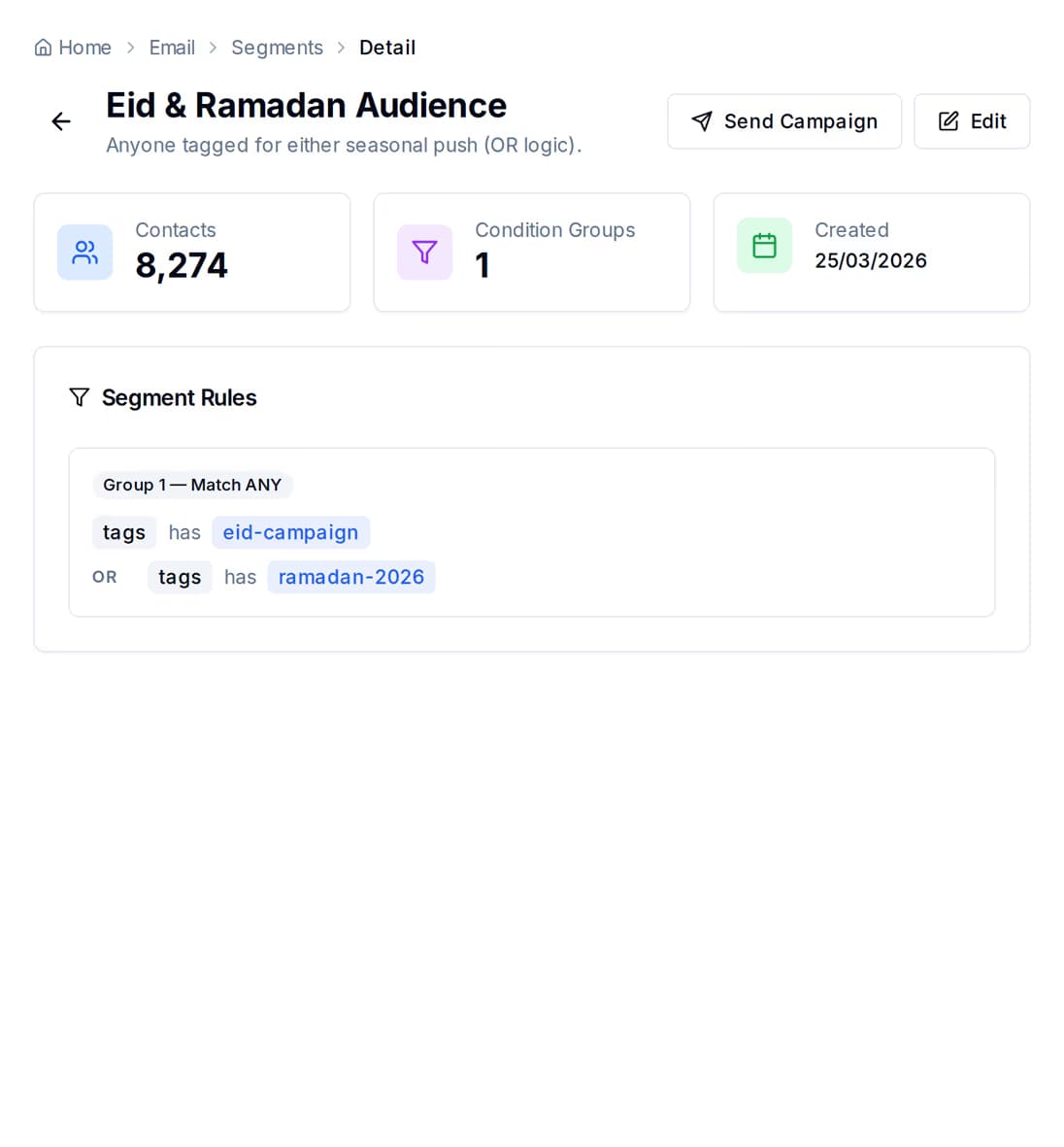
Build the audience from rules rather than by copying rows between spreadsheets — a tag for the class, when the guardian was added, how engaged they have been — and the matching count updates as you edit the rules. Save it once and every notice for that class reuses it.
Admission season is two weeks of phone calls and a long tail of families who never hear back — not because anyone decided against them, but because the note was on a different desk. Put the enquiry form where parents already are, and let the follow-up run on its own.
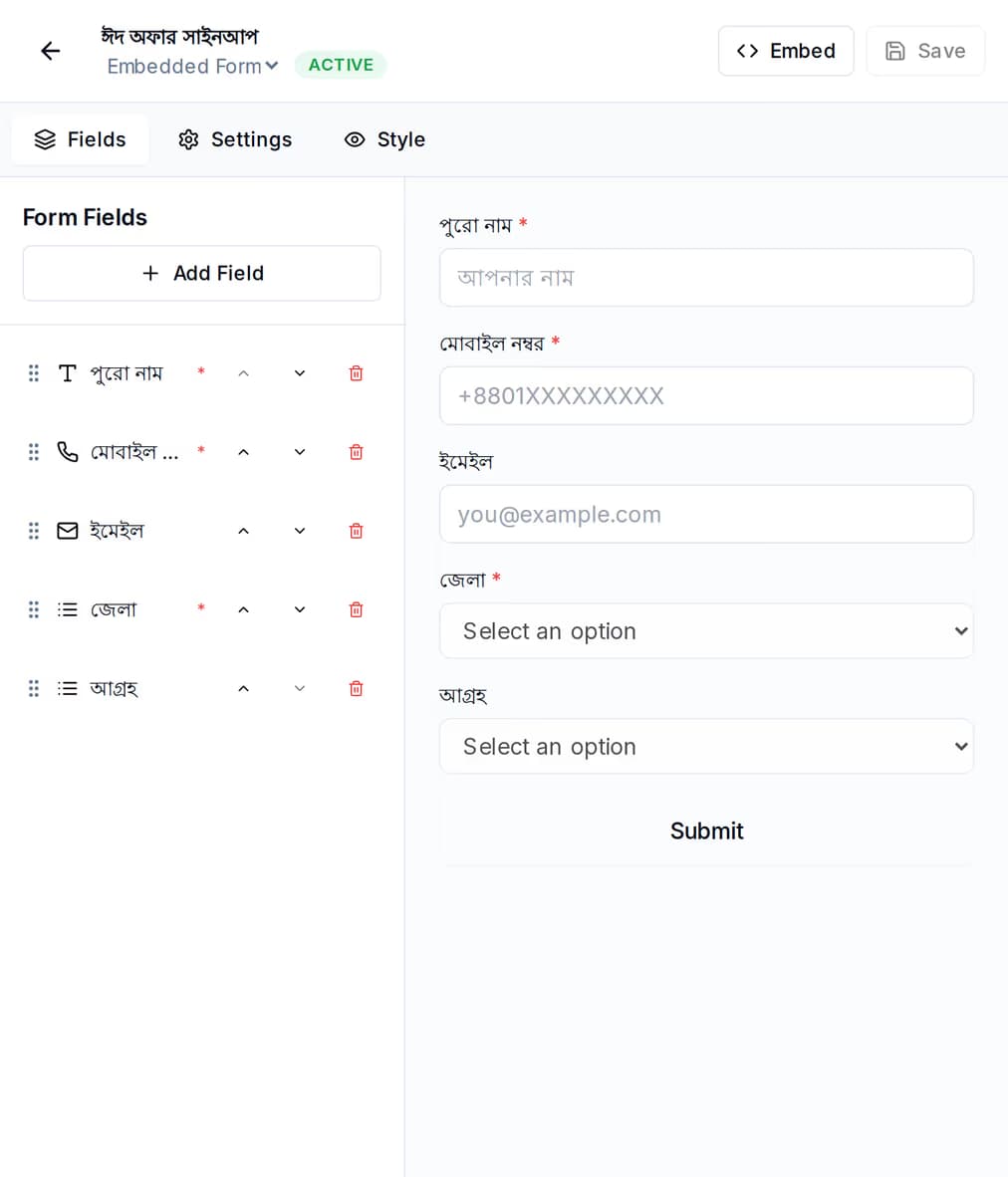
Build the enquiry form — guardian name, mobile, class applying for — and drop a single line of script onto your school website to embed it. Every submission is stored, and the form keeps its own view and conversion counts so you can tell whether the page is doing its job or just sitting there.
Build the follow-up once on the automation canvas: a first reply, a wait, a WhatsApp message with the prospectus, another wait, a last SMS before the deadline. Enquiries added to your list start the journey, and you can start one for a single family by hand.
When a guardian answers on WhatsApp, SMS or email, the reply arrives in the shared team inbox with the rest of that family history beside it. Whoever is on the desk picks it up — no forwarding, no personal phone.
SMS campaigns will not deliver during Bangladesh quiet hours, 9pm to 8am Dhaka time, and per-channel frequency caps stop one family being messaged five times in a single day.
Guessing is expensive when you are buying volume. Every campaign reports what it did, and the channel comparison puts email, WhatsApp and SMS beside each other so next term you spend on the one guardians answer.
Pricing is in taka. There is a platform fee for the tooling, and there is the volume you buy on each channel. The two work against each other on purpose: buying managed volume waives part of the platform fee, and buying across email, SMS and WhatsApp at a high enough tier waives it entirely. Longer billing terms discount the fee and the volume separately.
No, and it does not try to. QuickGrow keeps no attendance register, no exam marks and no fee ledger — those stay in whatever system or spreadsheet the office uses now. QuickGrow holds the guardian contact list and sends the messages. You supply the dates and figures a message should mention, either by importing a sheet or by pushing them in through the API.
With a masking sender, yes. You apply once with your institution details, registration and tax numbers, the contact person and national ID, sample messages, and a declaration that traffic stays inside Bangladesh. The contact mobile is verified by a one-time code, and the name goes live once approved. Non-masking SMS is the cheaper alternative and sends from a number instead of a name.
Yes, on all three channels. One thing to plan for on SMS: Bangla characters take more room, so a Bangla message fits about 70 characters before it counts as two messages, where English fits 160. Short reminders normally still fit in one — it is worth writing them tight.
Import the guardian list, write one reminder, and let the term run itself.
 CyberCraft BangladeshQuickGrow AI
Run every channel from one platform. Bring your own SMTP, SMS gateway, and WhatsApp number — or use ours.
See pricing →