Typed out by hand, one at a time
Confirming an order, saying the rider has left, apologising for a delay — each one is a person typing the same sentence into a phone while the kitchen is at full tilt. Miss a few and the calls start.
Order confirmations and delivery updates go out on WhatsApp without anyone typing them. A slow Tuesday gets a message to the diners who actually eat on Tuesdays, not to your whole list. And the people who order every week earn points they can spend on a free item.
The same handset takes the order, chases the rider, answers “where is my food”, and is somehow also supposed to bring that customer back next week. On a full Thursday, the last job never happens.
Confirming an order, saying the rider has left, apologising for a delay — each one is a person typing the same sentence into a phone while the kitchen is at full tilt. Miss a few and the calls start.
A sign in the window reaches the people who were coming anyway. Sending the offer to your whole contact list costs you a message for every name on it, most of whom were never going to eat out tonight.
The family that orders every Friday looks exactly like a first-timer in your records. Nothing counts their visits, and nothing gives them a reason to keep picking you over the place next door.
WhatsApp sorts business messages into three kinds, and order and account updates are their own kind: Utility. Meta prices each category separately and bills you directly at its own rate, with zero QuickGrow markup — so confirming an order is never charged as a promotion.
A template is a name, a category, and a body with blanks in it: “Hello {{1}}, your order {{2}} is confirmed.” Add a header, a footer and buttons if you want them. Write it in Bangla or English.
Pull your WhatsApp templates in from your business account and QuickGrow stores each one with its real category and status — approved, pending, rejected or disabled. The list you send from is the list Meta actually cleared.
One call to the QuickGrow API sends a template to a phone number with the blanks filled in — order number, rider name, time. Retry a call that timed out and the customer still only gets one message.
No developer? Tag the contact when the order goes in and an automation takes over: send, wait, check a field, send again. Same result, built by dragging steps around.
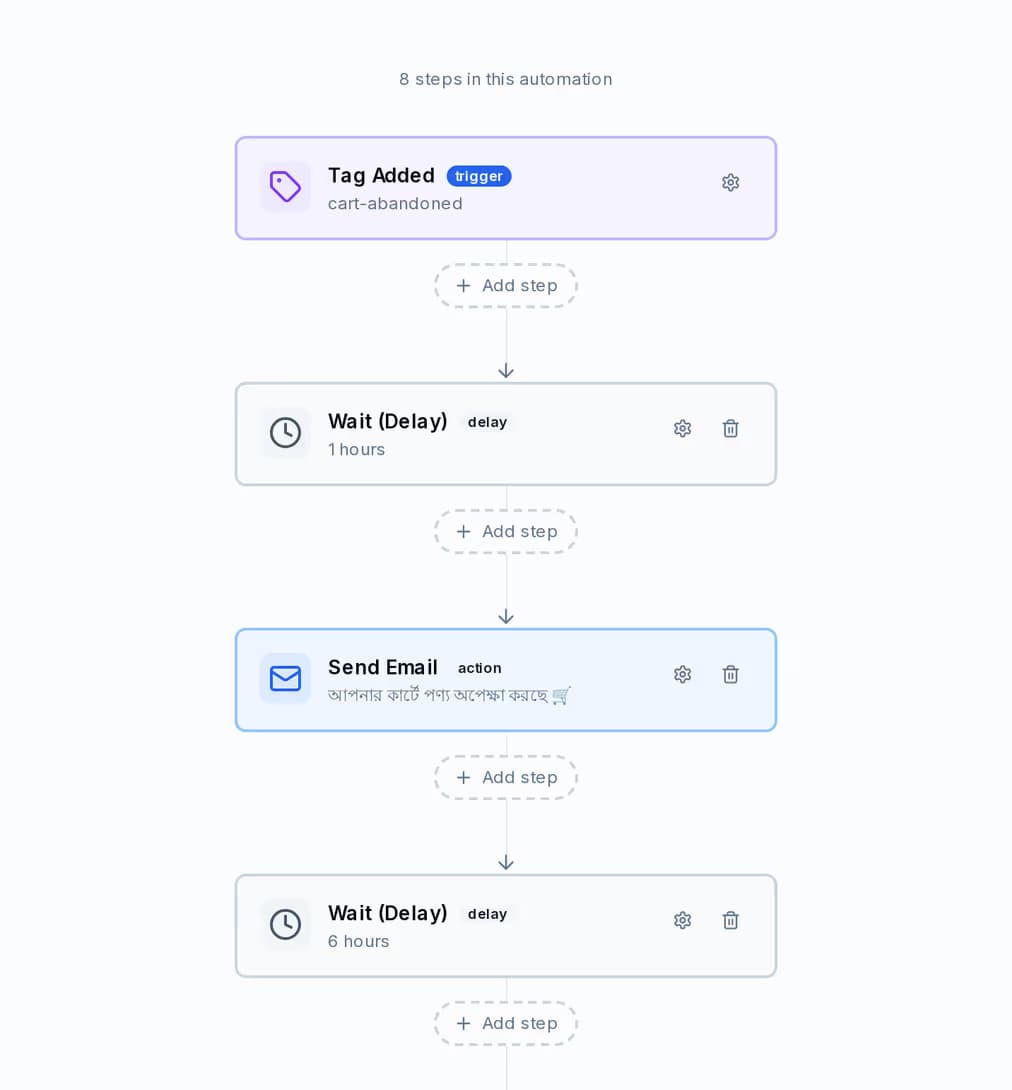
A journey is a trigger and a column of steps. You can see the order it runs in, the wait between each step, and which channel each message goes out on — before you switch it on, and after, in the run history.
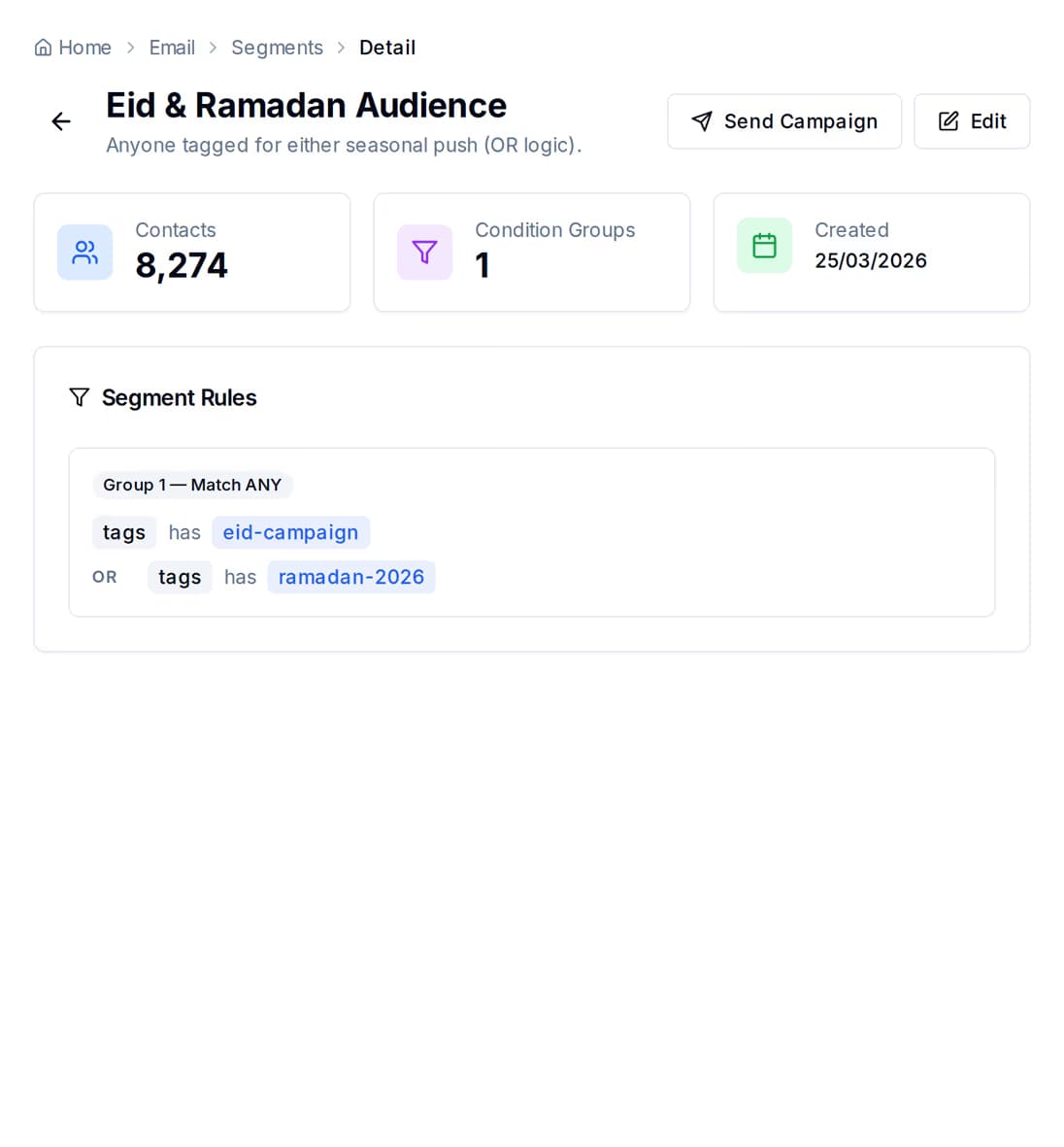
A group is a handful of rules, and it tells you how many contacts match before you send anything. Add a rule, watch the number move, and only then decide whether the offer is worth sending.
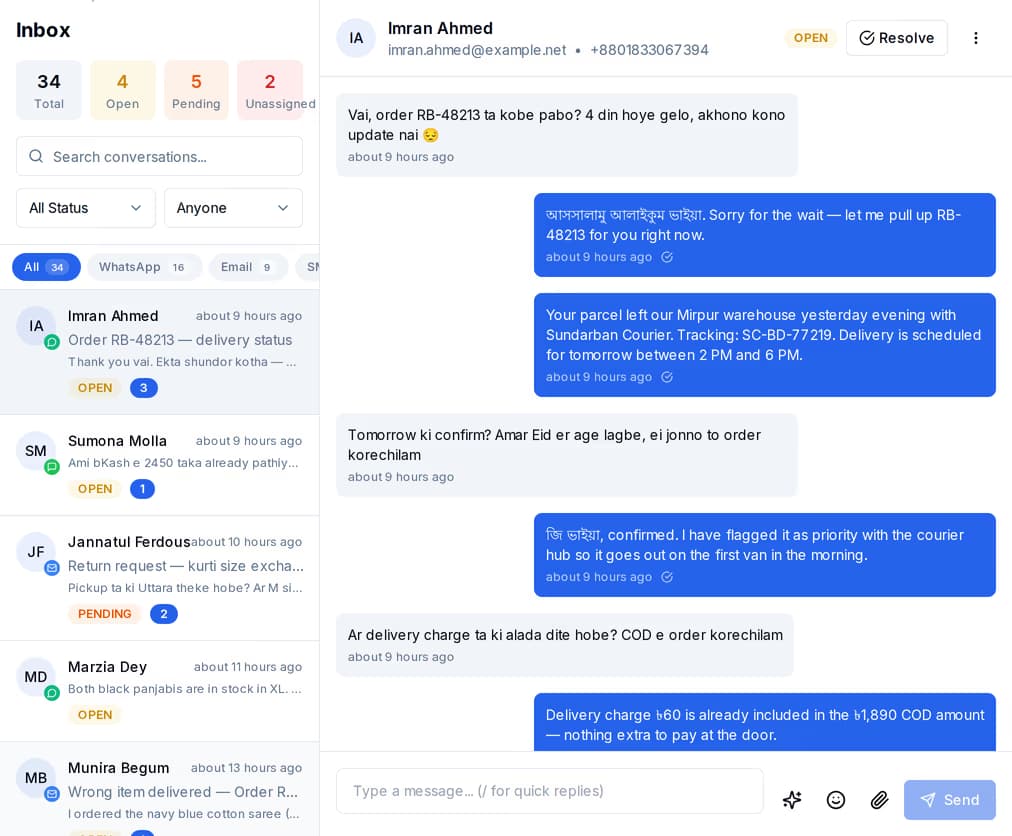
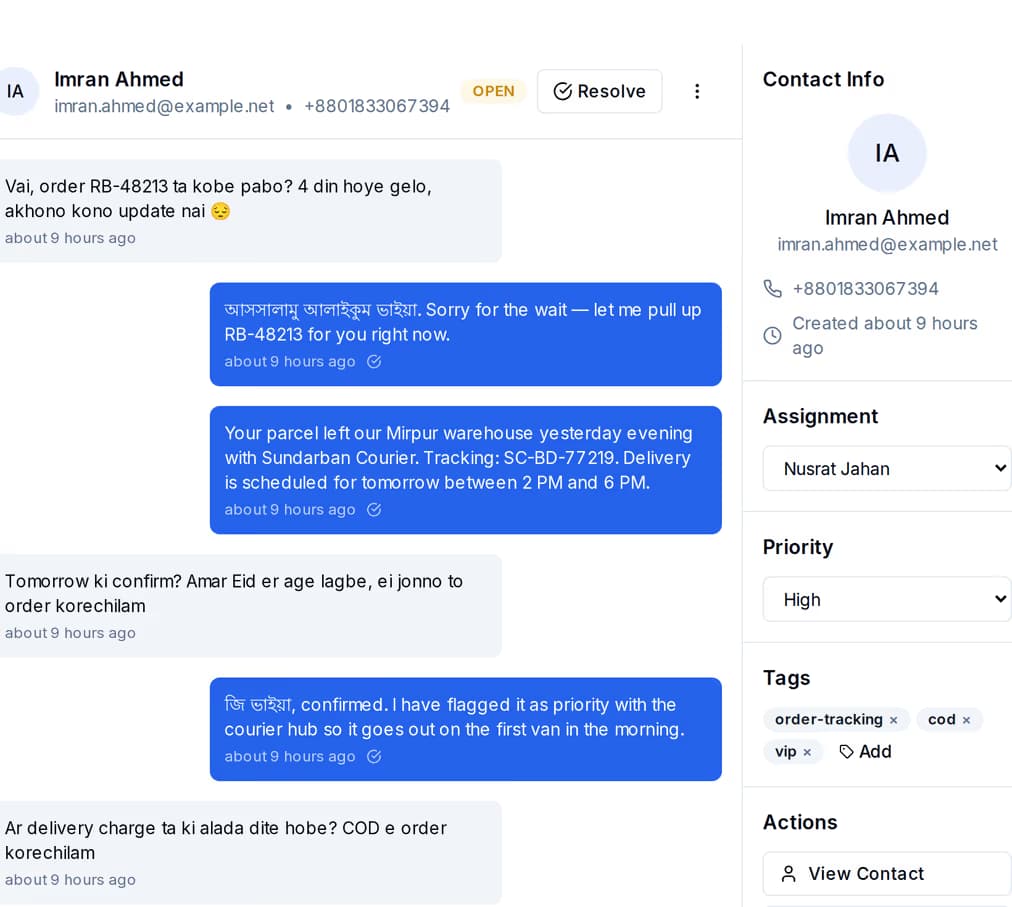
When someone replies to an order update, the reply becomes a thread in one shared inbox — WhatsApp, SMS and email in the same list, with the customer record open beside it.
Award points against a diner when they pay — for a purchase, a referral, or anything you decide is worth rewarding. QuickGrow keeps the balance, the lifetime total and the tier, and moves someone up the moment their lifetime total crosses the line. Points earn faster at every step up.
| Bronze | Silver | Gold | Platinum | |
|---|---|---|---|---|
| Lifetime points to get there | 0 | 500 | 2,000 | 5,000 |
| Earn rate on the points you award | 1x | 1.25x | 1.5x | 2x |
| What the diner is told they get | Rewards access | 25% bonus points | 50% bonus points, priority support | 2x points, exclusive rewards, VIP support |
| Can spend points in your rewards list | Yes | Yes | Yes | Yes |
Decide what points buy: a free product, a discount code, free delivery, or something you describe yourself. Set the points cost and the stock, switch a reward off when the special ends, and read every redemption back in one history.
Points are awarded with a reason and a reference, so a balance can be explained to the person holding it. You can also set how long points last and how much warning a diner gets before they run out.
Give each customer a code of their own, count what came in through it, and see who is actually sending you tables on a leaderboard.
Buy one channel or all three. Whatever you buy, the contacts, the groups, the journeys and the inbox are the same — you are not running three separate tools and reconciling them by hand.
| SMS | |||
|---|---|---|---|
| Best for | Order confirmations, delivery updates, back-and-forth with the customer | Tonight-only offers and reminders that have to be read | A weekly menu, receipts, a longer offer with pictures |
| You need | A number on WhatsApp and a business account | A mobile number | An email address |
| It arrives from | Your WhatsApp business profile | Your brand name with Masking SMS, a shared number without it | Your own address, from your mail server or ours |
| Sold as | Nothing to buy — Meta bills you directly, at Meta's own rate | Masking and non-masking, each on its own volume slider | Included volume, or bring your own mail server |
| Replies land in the shared inbox | Yes | Yes | Yes |
Two things: a platform fee, and the messages you send. Buying managed volume waives part of the platform fee, and buying enough Email and SMS volume waives it entirely. Already have your own mail server or SMS account? Bring it and pay the platform fee only. A longer billing term discounts the fee and the volume on separate ladders, and the pricing page does the blended sum for you.
Yes. WhatsApp bills by template category — Utility for order and account updates, Authentication for login codes, Marketing for promotions — set by Meta, and billed directly to your own payment method with zero QuickGrow markup on any of them.
Not by default. QuickGrow holds SMS and WhatsApp sends to a Bangladeshi number between 9pm and 8am local time. That keeps a late promotion from turning into a complaint, but it applies to order updates too — so if your kitchen serves past 9pm, raise it with us before you go live rather than after your first late service.
Not necessarily. If your ordering system can call a web address, one call to the QuickGrow API sends a template with the order number filled in, and a retried call will not send twice. If it cannot, tag the contact when the order goes in — by hand, from a form, or in bulk — and an automation sends the messages from there.
Set up one template, connect your list, and let the follow-up run itself.
 CyberCraft BangladeshQuickGrow AI
Run every channel from one platform. Bring your own SMTP, SMS gateway, and WhatsApp number — or use ours.
See pricing →